<?xml version="1.0" encoding="utf-8"?>
<feed xmlns="http://www.w3.org/2005/Atom">
    <id>https://docs.catalyst.merckgroup.com/release-notes</id>
    <title>Catalyst Documentation Blog</title>
    <updated>2026-09-30T00:00:00.000Z</updated>
    <generator>https://github.com/jpmonette/feed</generator>
    <link rel="alternate" href="https://docs.catalyst.merckgroup.com/release-notes"/>
    <subtitle>Catalyst Documentation Blog</subtitle>
    <icon>https://docs.catalyst.merckgroup.com/img/vibrantm.svg</icon>
    <entry>
        <title type="html"><![CDATA[Compare trials across every parameter and target]]></title>
        <id>https://docs.catalyst.merckgroup.com/release-notes/2026/09/30/parallel-coordinates</id>
        <link href="https://docs.catalyst.merckgroup.com/release-notes/2026/09/30/parallel-coordinates"/>
        <updated>2026-09-30T00:00:00.000Z</updated>
        <summary type="html"><![CDATA[See how each completed trial moves through its parameters and targets in a single parallel coordinates chart.]]></summary>
        <content type="html"><![CDATA[See how each completed trial moves through its parameters and targets in a single parallel coordinates chart.<!-- -->
<hr>
<h2 class="anchor anchorTargetStickyNavbar_tleR" id="whats-included">What's included<a href="https://docs.catalyst.merckgroup.com/release-notes/2026/09/30/parallel-coordinates#whats-included" class="hash-link" aria-label="Direct link to What's included" title="Direct link to What's included" translate="no">​</a></h2>
<h3 class="anchor anchorTargetStickyNavbar_tleR" id="parallel-coordinates">Parallel coordinates<a href="https://docs.catalyst.merckgroup.com/release-notes/2026/09/30/parallel-coordinates#parallel-coordinates" class="hash-link" aria-label="Direct link to Parallel coordinates" title="Direct link to Parallel coordinates" translate="no">​</a></h3>
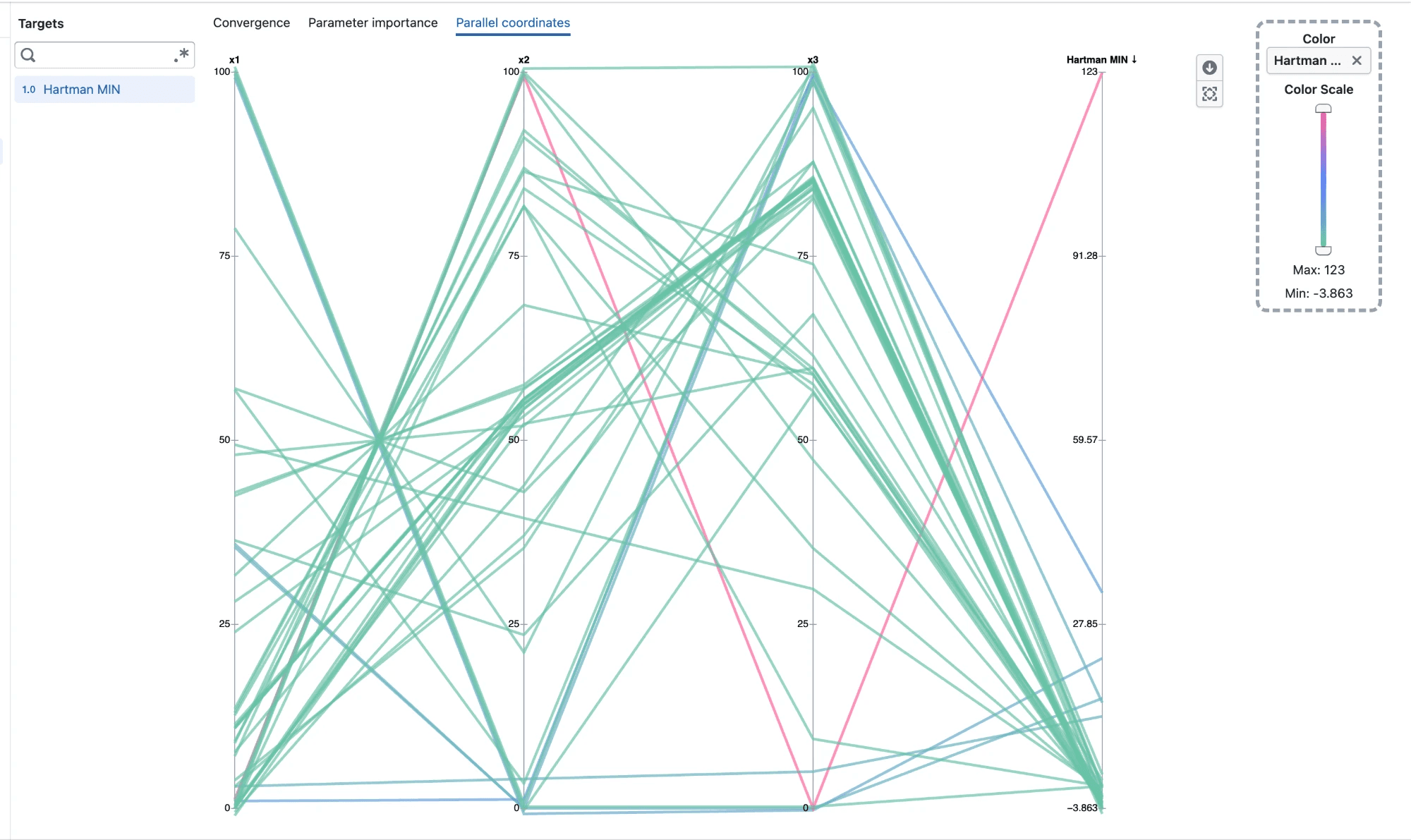
<p><img loading="lazy" alt="Parallel coordinates chart of Hartmann trials across x1, x2, x3 and the Hartman MIN target, colored by target value" src="https://docs.catalyst.merckgroup.com/assets/images/parallel-coordinates-17a4926c28f13b64853c1a40ca7e7b07.png" width="2000" height="1191"></p>
<ul>
<li class="">Open <strong>Parallel coordinates</strong> from an experiment's Visualization page</li>
<li class="">Each completed trial is drawn as one line, running across every parameter on the left and the selected targets on the right</li>
<li class="">Every axis has its own scale, so parameters and targets with different units can be compared side by side</li>
<li class="">Categorical parameters show one tick per category</li>
<li class="">Hover a line to see that trial's values on every axis</li>
</ul>
<h3 class="anchor anchorTargetStickyNavbar_tleR" id="reorder-axes">Reorder axes<a href="https://docs.catalyst.merckgroup.com/release-notes/2026/09/30/parallel-coordinates#reorder-axes" class="hash-link" aria-label="Direct link to Reorder axes" title="Direct link to Reorder axes" translate="no">​</a></h3>
<ul>
<li class="">Drag an axis title left or right to move that axis</li>
<li class="">Place related parameters next to each other, or move a parameter next to a target to see how they relate</li>
</ul>
<h3 class="anchor anchorTargetStickyNavbar_tleR" id="color-by-target">Color by target<a href="https://docs.catalyst.merckgroup.com/release-notes/2026/09/30/parallel-coordinates#color-by-target" class="hash-link" aria-label="Direct link to Color by target" title="Direct link to Color by target" translate="no">​</a></h3>
<ul>
<li class="">Lines are colored by the last selected target, so you can follow where trials end up</li>
<li class="">Drag any target from the sidebar onto <strong>Color</strong> to color by it instead</li>
<li class="">A target dropped onto <strong>Color</strong> is added to the chart if it is not already selected</li>
<li class="">Use the color scale slider to show only trials within a range of target values</li>
<li class="">Clear <strong>Color</strong> to show every line in a single color</li>
</ul>
<h3 class="anchor anchorTargetStickyNavbar_tleR" id="overlapping-trials">Overlapping trials<a href="https://docs.catalyst.merckgroup.com/release-notes/2026/09/30/parallel-coordinates#overlapping-trials" class="hash-link" aria-label="Direct link to Overlapping trials" title="Direct link to Overlapping trials" translate="no">​</a></h3>
<ul>
<li class="">Trials that share the same value on an axis are spread slightly apart, so each one stays visible</li>
<li class="">Trials with unique values stay exactly on their tick</li>
</ul>
<hr>
<h2 class="anchor anchorTargetStickyNavbar_tleR" id="notes">Notes<a href="https://docs.catalyst.merckgroup.com/release-notes/2026/09/30/parallel-coordinates#notes" class="hash-link" aria-label="Direct link to Notes" title="Direct link to Notes" translate="no">​</a></h2>
<ul>
<li class="">Only completed trials with a value on every axis are shown</li>
<li class="">Axis order and color choice reset when you leave the Parallel coordinates tab</li>
</ul>]]></content>
        <category label="New" term="New"/>
        <category label="Experiments" term="Experiments"/>
        <category label="Visualization" term="Visualization"/>
    </entry>
    <entry>
        <title type="html"><![CDATA[Linear constraints for discrete parameters]]></title>
        <id>https://docs.catalyst.merckgroup.com/release-notes/2026/09/23/weighted-discrete-linear-constraints</id>
        <link href="https://docs.catalyst.merckgroup.com/release-notes/2026/09/23/weighted-discrete-linear-constraints"/>
        <updated>2026-09-23T00:00:00.000Z</updated>
        <summary type="html"><![CDATA[Weight each discrete parameter with its own coefficient, and see a preview of the rule as you build it.]]></summary>
        <content type="html"><![CDATA[Weight each discrete parameter with its own coefficient, and see a preview of the rule as you build it.<!-- -->
<hr>
<h2 class="anchor anchorTargetStickyNavbar_tleR" id="whats-included">What's included<a href="https://docs.catalyst.merckgroup.com/release-notes/2026/09/23/weighted-discrete-linear-constraints#whats-included" class="hash-link" aria-label="Direct link to What's included" title="Direct link to What's included" translate="no">​</a></h2>
<h3 class="anchor anchorTargetStickyNavbar_tleR" id="linear-replaces-sum">Linear replaces Sum<a href="https://docs.catalyst.merckgroup.com/release-notes/2026/09/23/weighted-discrete-linear-constraints#linear-replaces-sum" class="hash-link" aria-label="Direct link to Linear replaces Sum" title="Direct link to Linear replaces Sum" translate="no">​</a></h3>
<ul>
<li class="">The <strong>Sum</strong> constraint for discrete numerical parameters is now called <strong>Linear</strong></li>
<li class="">Give each parameter a coefficient, for example <code>2 × x0 + x1 &lt;= 100</code></li>
<li class="">Coefficients start at 1, which gives a plain sum</li>
<li class="">Use a negative coefficient to compare two parameters</li>
</ul>
<h3 class="anchor anchorTargetStickyNavbar_tleR" id="preview-of-your-rule">Preview of your rule<a href="https://docs.catalyst.merckgroup.com/release-notes/2026/09/23/weighted-discrete-linear-constraints#preview-of-your-rule" class="hash-link" aria-label="Direct link to Preview of your rule" title="Direct link to Preview of your rule" translate="no">​</a></h3>
<ul>
<li class="">A preview below the form shows the rule as you fill it in, for example <code>2 · x0 + x1 &lt;= 100</code></li>
</ul>
<h3 class="anchor anchorTargetStickyNavbar_tleR" id="example-keep-x1-at-or-below-x0">Example: keep x1 at or below x0<a href="https://docs.catalyst.merckgroup.com/release-notes/2026/09/23/weighted-discrete-linear-constraints#example-keep-x1-at-or-below-x0" class="hash-link" aria-label="Direct link to Example: keep x1 at or below x0" title="Direct link to Example: keep x1 at or below x0" translate="no">​</a></h3>
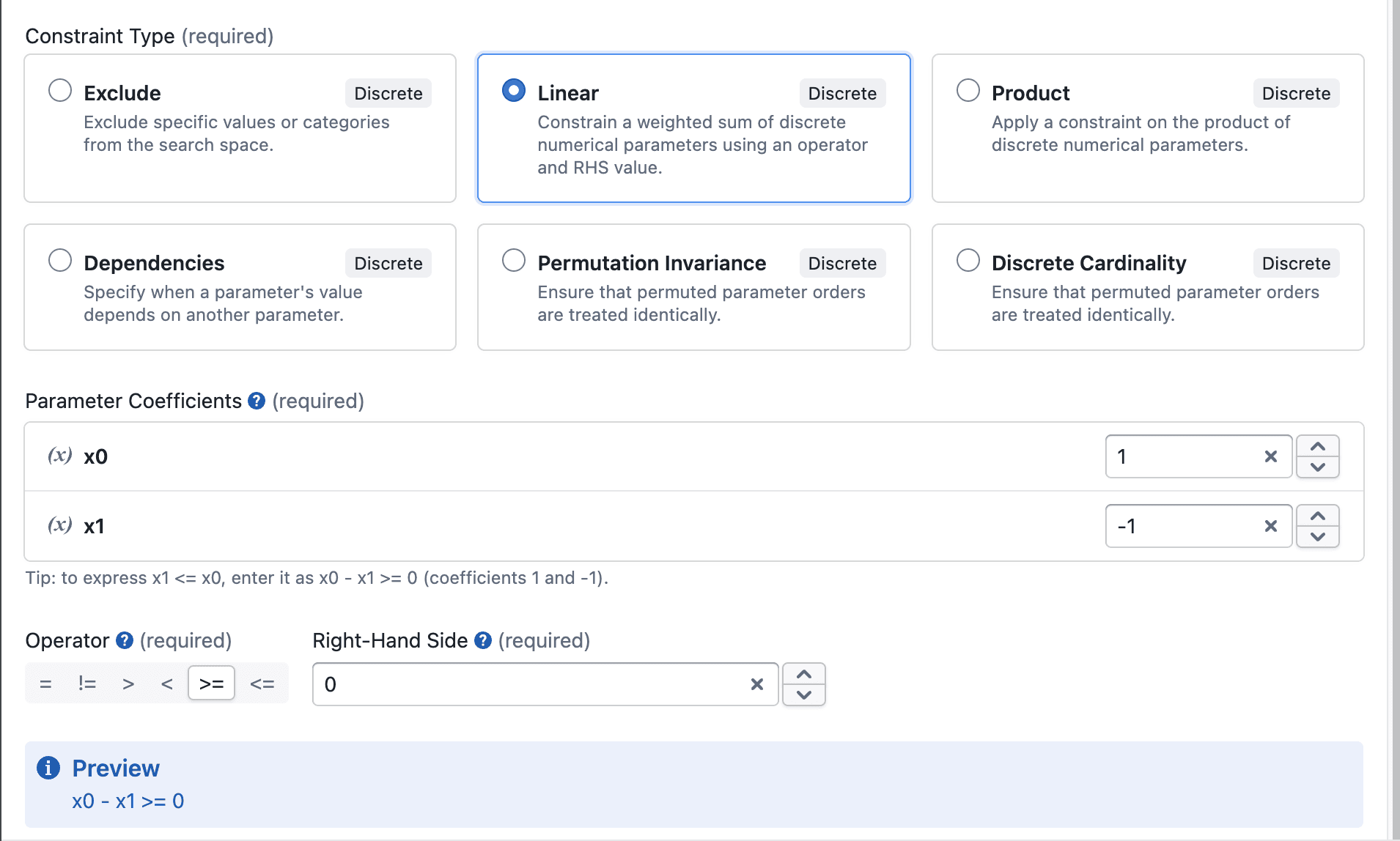
<p><img loading="lazy" alt="Linear constraint with coefficients 1 and -1, operator &amp;gt;= and right-hand side 0, previewed as x0 - x1 &amp;gt;= 0" src="https://docs.catalyst.merckgroup.com/assets/images/discrete-linear-constraint-16f5a9677e92187da5bfa26dde9c609c.png" width="1910" height="1148"></p>
<p>To make sure <code>x1 ≤ x0</code>, write it as <code>x0 − x1 ≥ 0</code> and add a <strong>Linear</strong> constraint:</p>
<ul>
<li class="">Coefficients: <code>x0</code> = <strong>1</strong>, <code>x1</code> = <strong>−1</strong></li>
<li class="">Operator: <strong>&gt;=</strong></li>
<li class="">Right-Hand Side: <strong>0</strong></li>
</ul>
<h3 class="anchor anchorTargetStickyNavbar_tleR" id="other-improvements">Other improvements<a href="https://docs.catalyst.merckgroup.com/release-notes/2026/09/23/weighted-discrete-linear-constraints#other-improvements" class="hash-link" aria-label="Direct link to Other improvements" title="Direct link to Other improvements" translate="no">​</a></h3>
<ul>
<li class="">Negative numbers and decimals can be typed directly in Linear and Product constraints</li>
<li class="">Removing a parameter from the <strong>Selected</strong> list now also removes its coefficient or condition</li>
</ul>
<hr>
<h2 class="anchor anchorTargetStickyNavbar_tleR" id="notes">Notes<a href="https://docs.catalyst.merckgroup.com/release-notes/2026/09/23/weighted-discrete-linear-constraints#notes" class="hash-link" aria-label="Direct link to Notes" title="Direct link to Notes" translate="no">​</a></h2>
<ul>
<li class="">Your existing Sum constraints are now Linear constraints with every coefficient set to 1, so they work exactly as before</li>
<li class="">Tolerance only applies to the = and != operators</li>
</ul>]]></content>
        <category label="Enhancement" term="Enhancement"/>
        <category label="Experiments" term="Experiments"/>
    </entry>
    <entry>
        <title type="html"><![CDATA[Convergence plots organized by observation order]]></title>
        <id>https://docs.catalyst.merckgroup.com/release-notes/2026/09/04/convergence-observation-order</id>
        <link href="https://docs.catalyst.merckgroup.com/release-notes/2026/09/04/convergence-observation-order"/>
        <updated>2026-09-04T00:00:00.000Z</updated>
        <summary type="html"><![CDATA[Follow optimization progress more clearly with completed results ordered as observations and predictions grouped separately.]]></summary>
        <content type="html"><![CDATA[Follow optimization progress more clearly with completed results ordered as observations and predictions grouped separately.<!-- -->
<hr>
<h2 class="anchor anchorTargetStickyNavbar_tleR" id="whats-included">What's included<a href="https://docs.catalyst.merckgroup.com/release-notes/2026/09/04/convergence-observation-order#whats-included" class="hash-link" aria-label="Direct link to What's included" title="Direct link to What's included" translate="no">​</a></h2>
<h3 class="anchor anchorTargetStickyNavbar_tleR" id="a-clearer-optimization-sequence">A clearer optimization sequence<a href="https://docs.catalyst.merckgroup.com/release-notes/2026/09/04/convergence-observation-order#a-clearer-optimization-sequence" class="hash-link" aria-label="Direct link to A clearer optimization sequence" title="Direct link to A clearer optimization sequence" translate="no">​</a></h3>
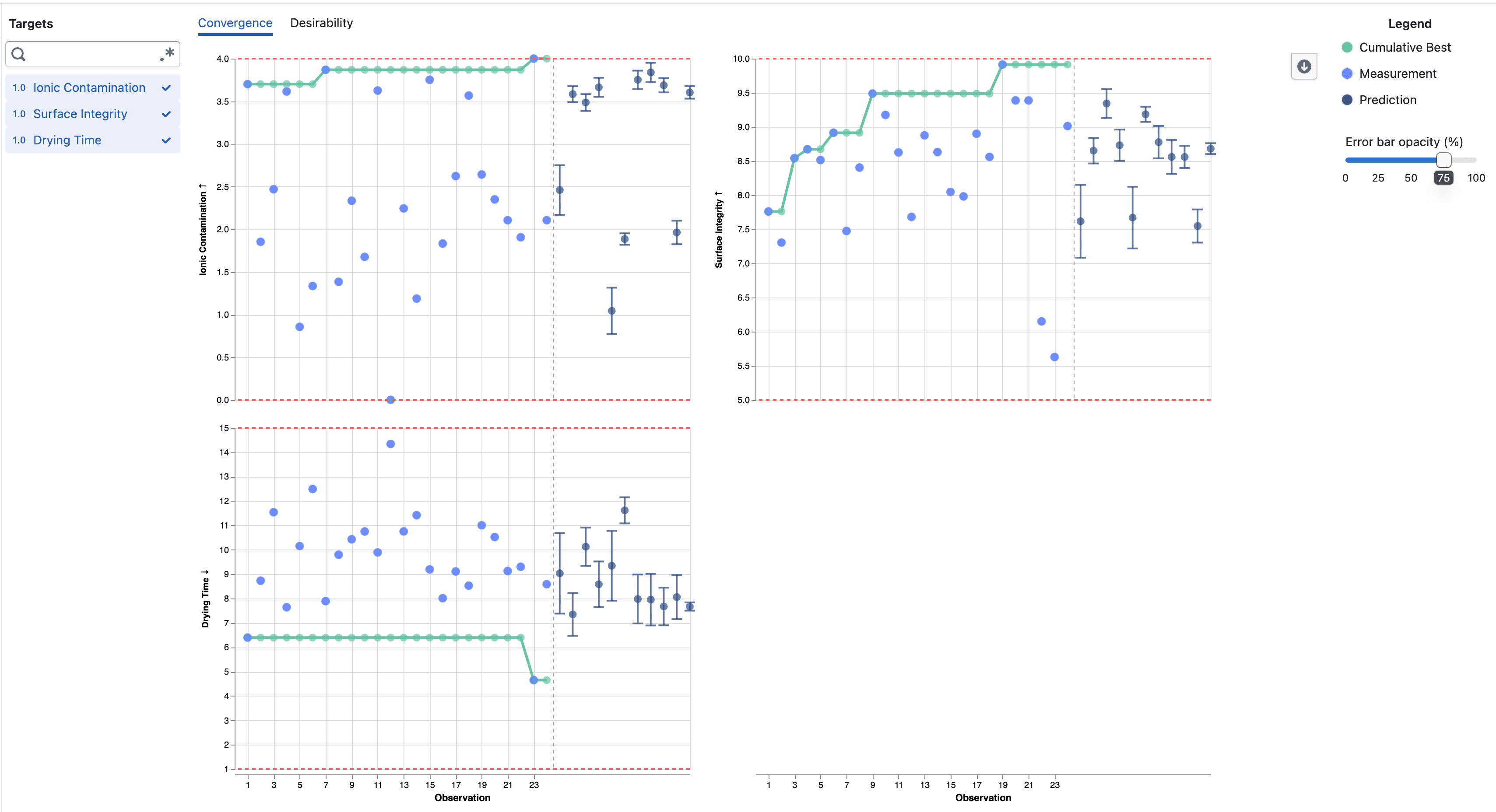
<p><img loading="lazy" alt="Convergence plots showing completed observations followed by predictions" src="https://docs.catalyst.merckgroup.com/assets/images/convergence-observation-order-4c9b5dfc634e3a8f0dc6e98895ae8d3c.png" width="3418" height="1856"></p>
<ul>
<li class="">Completed target results are numbered in completion order, without gaps from trials that did not produce a measurement</li>
<li class="">The original trial number and completion time remain available in the point details</li>
<li class="">Predictions for Pending and Accepted trials appear after the completed observations</li>
<li class="">A dashed divider separates measured results from predictions across selected targets</li>
</ul>
<hr>
<h2 class="anchor anchorTargetStickyNavbar_tleR" id="notes">Notes<a href="https://docs.catalyst.merckgroup.com/release-notes/2026/09/04/convergence-observation-order#notes" class="hash-link" aria-label="Direct link to Notes" title="Direct link to Notes" translate="no">​</a></h2>
<ul>
<li class="">The observation number can differ from the original trial number when trials finish out of order or do not produce a target result</li>
<li class="">Predictions remain model estimates and include error bars showing one posterior standard deviation above and below the mean</li>
</ul>]]></content>
        <category label="Enhancement" term="Enhancement"/>
        <category label="Experiments" term="Experiments"/>
        <category label="Visualization" term="Visualization"/>
    </entry>
    <entry>
        <title type="html"><![CDATA[Understand what drives experiment predictions]]></title>
        <id>https://docs.catalyst.merckgroup.com/release-notes/2026/09/03/parameter-importance</id>
        <link href="https://docs.catalyst.merckgroup.com/release-notes/2026/09/03/parameter-importance"/>
        <updated>2026-09-03T00:00:00.000Z</updated>
        <summary type="html"><![CDATA[Explore how each parameter influences experiment targets with SHAP-based importance visualizations.]]></summary>
        <content type="html"><![CDATA[Explore how each parameter influences experiment targets with SHAP-based importance visualizations.<!-- -->
<hr>
<h2 class="anchor anchorTargetStickyNavbar_tleR" id="whats-included">What's included<a href="https://docs.catalyst.merckgroup.com/release-notes/2026/09/03/parameter-importance#whats-included" class="hash-link" aria-label="Direct link to What's included" title="Direct link to What's included" translate="no">​</a></h2>
<h3 class="anchor anchorTargetStickyNavbar_tleR" id="parameter-importance">Parameter importance<a href="https://docs.catalyst.merckgroup.com/release-notes/2026/09/03/parameter-importance#parameter-importance" class="hash-link" aria-label="Direct link to Parameter importance" title="Direct link to Parameter importance" translate="no">​</a></h3>
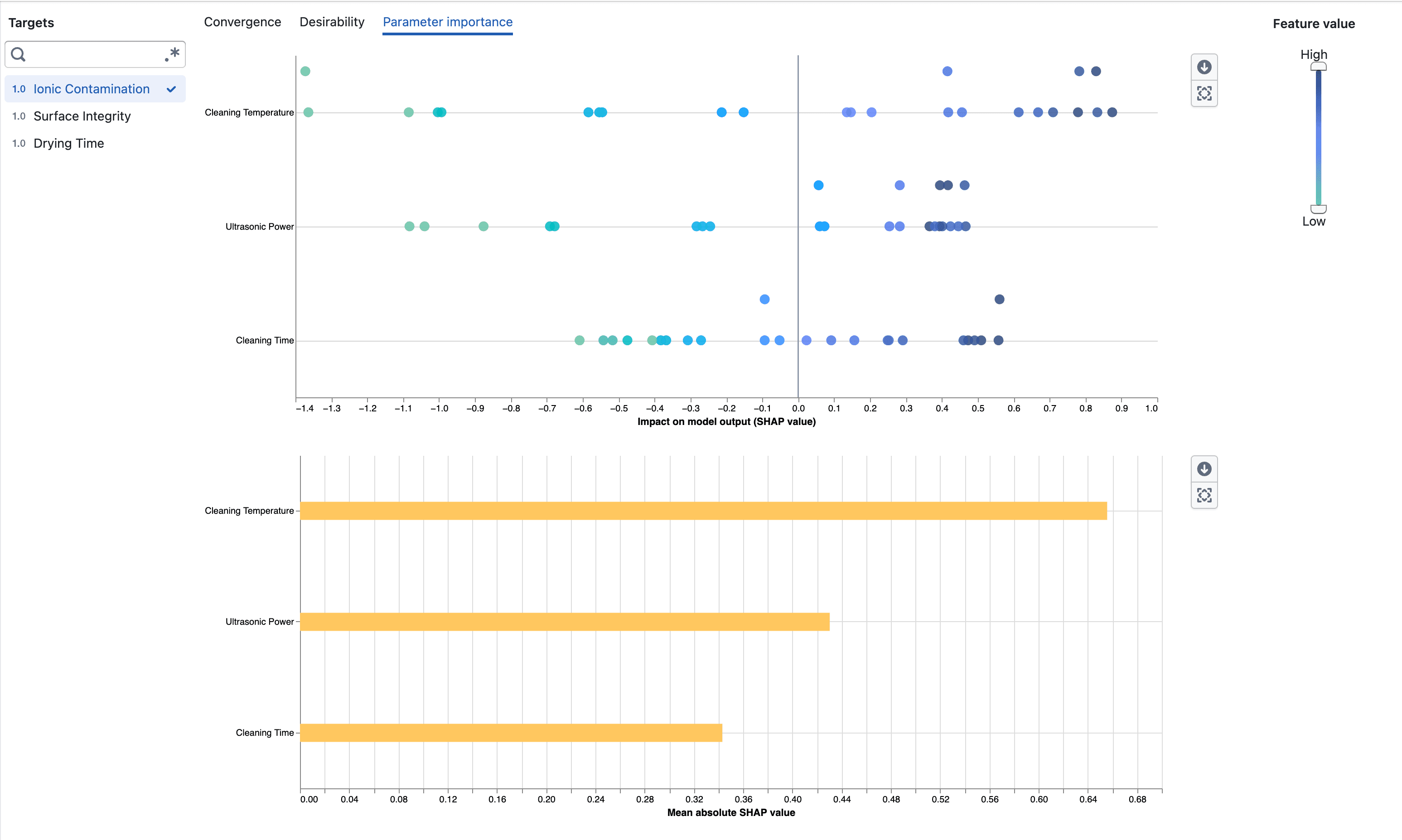
<p><img loading="lazy" alt="Parameter importance beeswarm and mean absolute SHAP charts" src="https://docs.catalyst.merckgroup.com/assets/images/parameter-importance-b589e0c94a95f18c60e4d4dadc221b0c.png" width="3094" height="1854"></p>
<ul>
<li class="">Open <strong>Parameter importance</strong> from an experiment's Visualization page</li>
<li class="">Select a target to inspect how its parameters contribute to the surrogate model output</li>
<li class="">Compare parameters using their mean absolute SHAP values</li>
<li class="">See the direction and distribution of each parameter's impact in the beeswarm plot</li>
<li class="">Use the feature-value scale to focus on observations with low or high numeric parameter values</li>
</ul>
<hr>
<h2 class="anchor anchorTargetStickyNavbar_tleR" id="notes">Notes<a href="https://docs.catalyst.merckgroup.com/release-notes/2026/09/03/parameter-importance#notes" class="hash-link" aria-label="Direct link to Notes" title="Direct link to Notes" translate="no">​</a></h2>
<ul>
<li class="">Parameter importance requires enough completed measurements to fit the surrogate model</li>
<li class="">SHAP values describe model behavior and do not imply that a parameter causes a target outcome</li>
</ul>]]></content>
        <category label="New" term="New"/>
        <category label="Experiments" term="Experiments"/>
        <category label="Visualization" term="Visualization"/>
    </entry>
    <entry>
        <title type="html"><![CDATA[Target predictions for open experiment trials]]></title>
        <id>https://docs.catalyst.merckgroup.com/release-notes/2026/08/13/trial-target-predictions</id>
        <link href="https://docs.catalyst.merckgroup.com/release-notes/2026/08/13/trial-target-predictions"/>
        <updated>2026-08-13T00:00:00.000Z</updated>
        <summary type="html"><![CDATA[View BayBE target predictions and their uncertainty for Pending and Accepted trials.]]></summary>
        <content type="html"><![CDATA[View BayBE target predictions and their uncertainty for Pending and Accepted trials.<!-- -->
<hr>
<h2 class="anchor anchorTargetStickyNavbar_tleR" id="whats-included">What's included<a href="https://docs.catalyst.merckgroup.com/release-notes/2026/08/13/trial-target-predictions#whats-included" class="hash-link" aria-label="Direct link to What's included" title="Direct link to What's included" translate="no">​</a></h2>
<h3 class="anchor anchorTargetStickyNavbar_tleR" id="predictions-in-trial-cards">Predictions in trial cards<a href="https://docs.catalyst.merckgroup.com/release-notes/2026/08/13/trial-target-predictions#predictions-in-trial-cards" class="hash-link" aria-label="Direct link to Predictions in trial cards" title="Direct link to Predictions in trial cards" translate="no">​</a></h3>
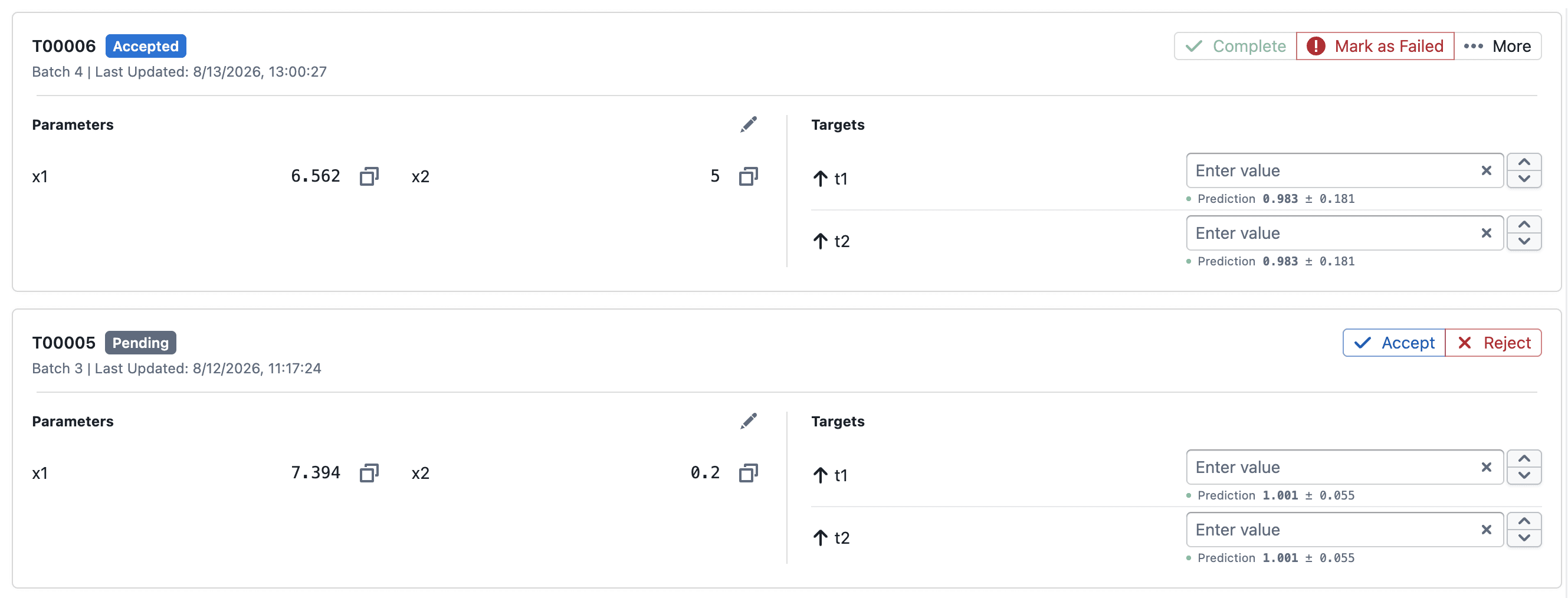
<p><img loading="lazy" alt="Predictions displayed for Pending and Accepted trial targets" src="https://docs.catalyst.merckgroup.com/assets/images/trial-target-predictions-f484104c1806afd97784e2cccc016329.png" width="2658" height="1014"></p>
<ul>
<li class="">Pending and Accepted trial cards show each target's predicted mean and posterior standard deviation as <code>mean ± std</code></li>
<li class="">Predictions update as completed trial results are added to the experiment</li>
</ul>
<h3 class="anchor anchorTargetStickyNavbar_tleR" id="predictions-in-convergence">Predictions in Convergence<a href="https://docs.catalyst.merckgroup.com/release-notes/2026/08/13/trial-target-predictions#predictions-in-convergence" class="hash-link" aria-label="Direct link to Predictions in Convergence" title="Direct link to Predictions in Convergence" translate="no">​</a></h3>
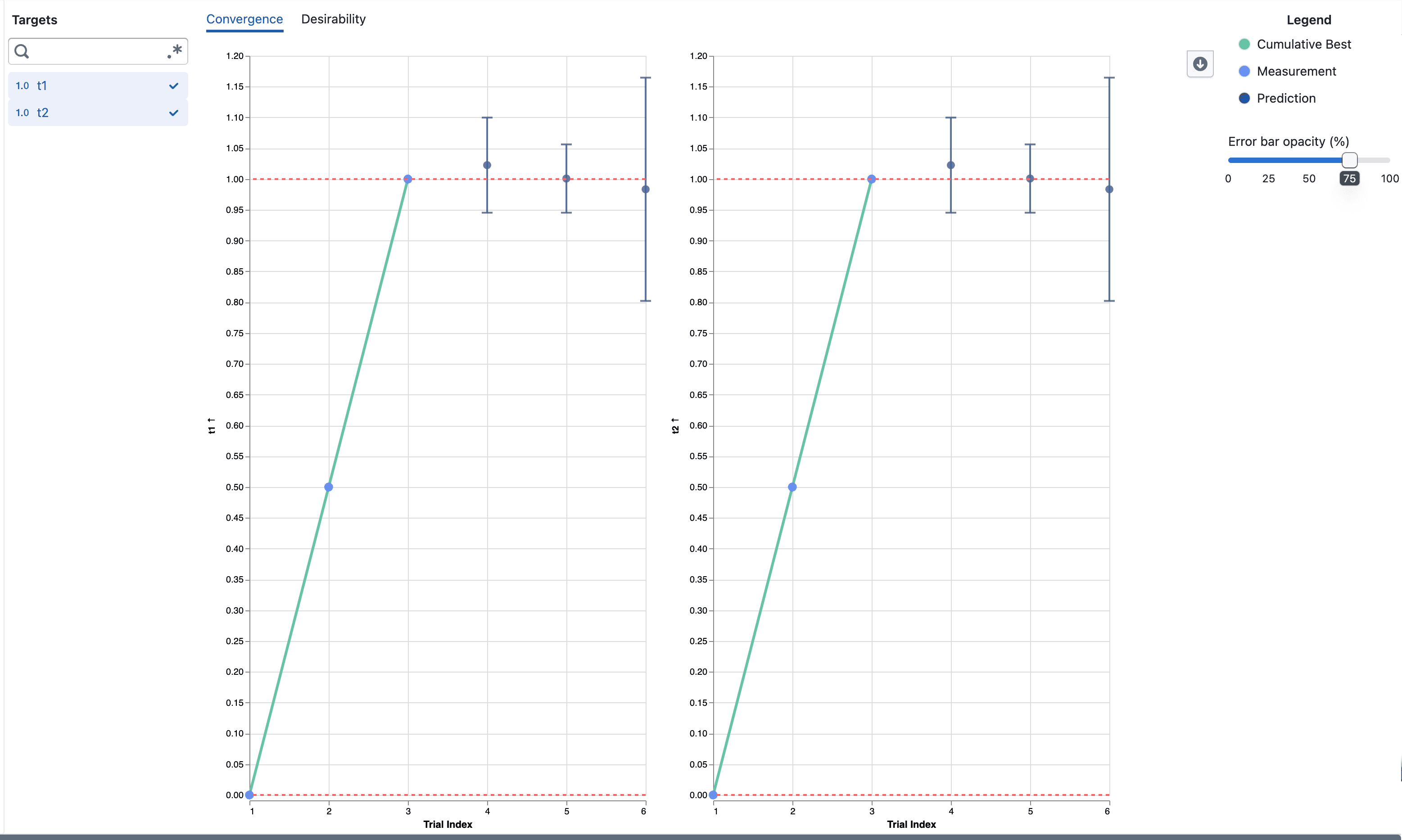
<p><img loading="lazy" alt="Predictions and error bars in the Convergence visualization" src="https://docs.catalyst.merckgroup.com/assets/images/convergence-predictions-f46010ee23633688c01ef7473fca2351.png" width="3114" height="1866"></p>
<ul>
<li class="">Prediction points appear alongside completed measurements on the same target axis</li>
<li class="">Error bars extend from <code>mean − std</code> to <code>mean + std</code> to show model uncertainty</li>
<li class="">Hover over a prediction to inspect its value and error-bar bounds</li>
<li class="">Use <strong>Error bar opacity (%)</strong> to adjust the visibility of the error bars, including hiding them at 0%</li>
</ul>
<hr>
<h2 class="anchor anchorTargetStickyNavbar_tleR" id="notes">Notes<a href="https://docs.catalyst.merckgroup.com/release-notes/2026/08/13/trial-target-predictions#notes" class="hash-link" aria-label="Direct link to Notes" title="Direct link to Notes" translate="no">​</a></h2>
<ul>
<li class="">Predictions are model estimates and are not measured target results</li>
<li class="">Error-bar bounds are not observed minimum and maximum values or a confidence interval</li>
</ul>]]></content>
        <category label="New" term="New"/>
        <category label="Experiments" term="Experiments"/>
        <category label="Visualization" term="Visualization"/>
    </entry>
    <entry>
        <title type="html"><![CDATA[Sync Trials to Foundry Dataset]]></title>
        <id>https://docs.catalyst.merckgroup.com/release-notes/2026/07/06/sync-trials-to-dataset</id>
        <link href="https://docs.catalyst.merckgroup.com/release-notes/2026/07/06/sync-trials-to-dataset"/>
        <updated>2026-07-06T00:00:00.000Z</updated>
        <summary type="html"><![CDATA[Sync your experiment trials to a linked Foundry dataset with one click, writing a snapshot of all trial data as a Parquet file.]]></summary>
        <content type="html"><![CDATA[Sync your experiment trials to a linked Foundry dataset with one click, writing a snapshot of all trial data as a Parquet file.<!-- -->
<hr>
<h2 class="anchor anchorTargetStickyNavbar_tleR" id="whats-included">What's included<a href="https://docs.catalyst.merckgroup.com/release-notes/2026/07/06/sync-trials-to-dataset#whats-included" class="hash-link" aria-label="Direct link to What's included" title="Direct link to What's included" translate="no">​</a></h2>
<h3 class="anchor anchorTargetStickyNavbar_tleR" id="sync-button-on-the-trials-page">Sync button on the trials page<a href="https://docs.catalyst.merckgroup.com/release-notes/2026/07/06/sync-trials-to-dataset#sync-button-on-the-trials-page" class="hash-link" aria-label="Direct link to Sync button on the trials page" title="Direct link to Sync button on the trials page" translate="no">​</a></h3>
<p><img loading="lazy" alt="The Views button in the study toolbar" src="https://docs.catalyst.merckgroup.com/assets/images/sync-button-535206e08c0073860b86ff2de6c02ff1.png" width="3590" height="252"></p>
<p>A new <strong>Sync</strong> button sits in the top-right toolbar of the experiment trials page, next to the Add and Upload controls.</p>
<ul>
<li class="">Click <strong>Sync</strong> to export all trials for the experiment to the linked Foundry dataset</li>
<li class="">The button shows a loading spinner while the sync runs and toasts the number of rows synced on completion</li>
<li class="">The button is disabled when there are no trials or no Foundry dataset is linked to the experiment</li>
</ul>
<h3 class="anchor anchorTargetStickyNavbar_tleR" id="what-gets-synced">What gets synced<a href="https://docs.catalyst.merckgroup.com/release-notes/2026/07/06/sync-trials-to-dataset#what-gets-synced" class="hash-link" aria-label="Direct link to What gets synced" title="Direct link to What gets synced" translate="no">​</a></h3>
<ul>
<li class="">Only trials where all parameters are complete are included, regardless of state</li>
<li class="">Each sync overwrites the previous snapshot</li>
</ul>
<hr>
<h2 class="anchor anchorTargetStickyNavbar_tleR" id="notes">Notes<a href="https://docs.catalyst.merckgroup.com/release-notes/2026/07/06/sync-trials-to-dataset#notes" class="hash-link" aria-label="Direct link to Notes" title="Direct link to Notes" translate="no">​</a></h2>
<ul>
<li class="">The Sync button requires a Foundry dataset to be linked to the experiment at creation time</li>
<li class="">Each sync is a full snapshot — incremental/append writes are not currently supported</li>
</ul>]]></content>
        <category label="New" term="New"/>
        <category label="Experiments" term="Experiments"/>
    </entry>
    <entry>
        <title type="html"><![CDATA[Saved Views for Plot and Correlations]]></title>
        <id>https://docs.catalyst.merckgroup.com/release-notes/2026/06/30/saved-views</id>
        <link href="https://docs.catalyst.merckgroup.com/release-notes/2026/06/30/saved-views"/>
        <updated>2026-06-30T00:00:00.000Z</updated>
        <summary type="html"><![CDATA[Save and reapply chart configurations across Plot Builder and Correlation analysis. Build up a view by adding chart settings one tab at a time, then share a link to reproduce the exact setup.]]></summary>
        <content type="html"><![CDATA[Save and reapply chart configurations across Plot Builder and Correlation analysis. Build up a view by adding chart settings one tab at a time, then share a link to reproduce the exact setup.<!-- -->
<hr>
<h2 class="anchor anchorTargetStickyNavbar_tleR" id="whats-included">What's included<a href="https://docs.catalyst.merckgroup.com/release-notes/2026/06/30/saved-views#whats-included" class="hash-link" aria-label="Direct link to What's included" title="Direct link to What's included" translate="no">​</a></h2>
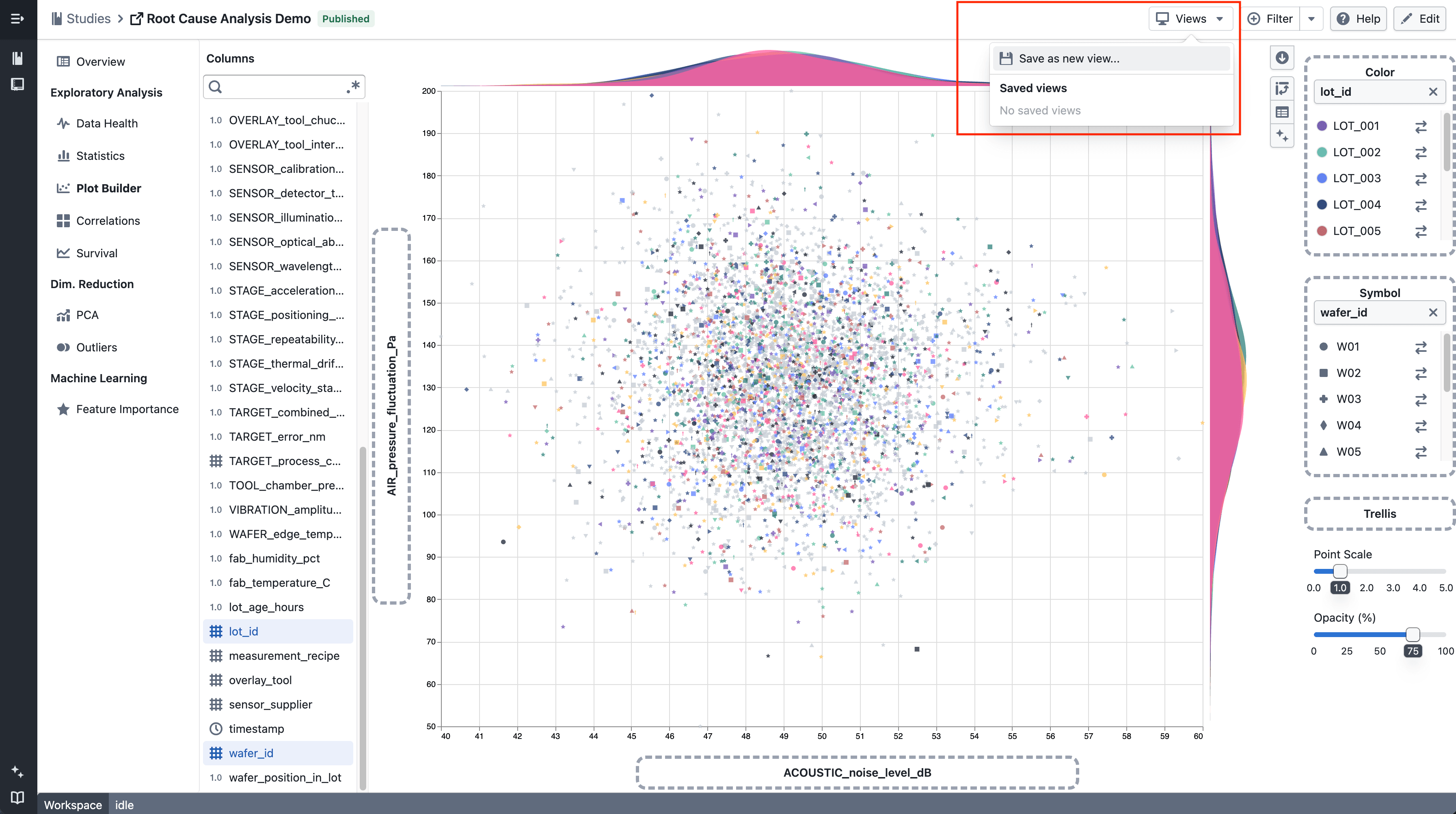
<h3 class="anchor anchorTargetStickyNavbar_tleR" id="views-menu">Views menu<a href="https://docs.catalyst.merckgroup.com/release-notes/2026/06/30/saved-views#views-menu" class="hash-link" aria-label="Direct link to Views menu" title="Direct link to Views menu" translate="no">​</a></h3>
<p><img loading="lazy" alt="The Views button in the study toolbar" src="data:image/png;base64,iVBORw0KGgoAAAANSUhEUgAADgIAAACQCAMAAABHsGFYAAAANlBMVEX////x8fJga3zPz8//JQHq8u4lKjL3+PkcISj8/PzV1dXa3OC8wMSmra6LkpYdcENMUFVxgX/dOY+TAAAACXBIWXMAABYlAAAWJQFJUiTwAAAgAElEQVR42u2dCWKjOBAAORYw6Bj4/2cXdIAEAmMnjolTteuZBLCR8DEqt9Sd3V5IBgAAAADwLv4DCy8FiEABAQAAAAAFRAEBBUQBAQAAAAAFRAEBBUQBAQAAAAAFRAEBBUQBAQAAAAAFRAEBBQQAAAAAQAFRQEABAQAAAABQQBQQUEAAAAAAABQQBQQUEAAAAAAABUQBAQUEAAAAAEABUUBAAQEAAAAABUQBAVBAAAAAAEABUUBAAVFAAAAAAPhABaTnACggAAAAACBC9BxQQBQQAAAAABAheg4oIAoIAAAAAIgQPb8S7du5XttQQAAAAABAAXePayrxCVTNXs+v1UEpv9i7lWTlXSnfStnl7bXatt8iFBAAAAAAUMDPEECjSTs9v1Yrn1PAoHdxlE3ICyBScbe3tk0cRQJRQAAAAAD4wwpYzRGm9rf+kflYZrWjgJfp4ISUTzyXYe8iy+pG26mat1KNptdtjeuNbdtpEQoIAAAAACjgZIDNh/S3mS1pPRH0Us18SgHD3sVxtvLNAmiUq9xG3d7btlSLUEAAAAAAQAEnsWg+psNzZy6dDuZJBUw9VW0u5QUMcDQuKder797ctkSLUEAAAAAAQAHHIGD1QT32vflIBdw+V9NUS9FcArGeePn2tomDqaAoIAAAAAD8WQX8pCCgCZR9sAL63i2a1ZTXCAJOQbeyaS/Vtk2LUEAAAAAAQAEnBfyoLn+0Aq6frLZtpGwuwtiSMOh2gbatWoQCAgAAAAAKiAKigCggCgh/nrbJq/eSNy1PAwAAAAqIAqKAKCDAD9BUV6DhiQAAAEABUUAUEAUEeDl5dQ1yngoAAAAUEAVEAVFAgOwvxACJAwIAAKCAKCAKiAICvJ62ug6sBwQAAEABUUAU8CMVUOiiyLLC4LcVhf7N78WyXy5BX/LhmxEEJAwIAADwixRwGp7uc/Fh6oMKKLSeequft7LrKmBn+qa1Uijg1RRQFykFLPQv/rDpw2vQ8+H7i6iuBE8HAADAexTw0ACvPkx9RAFj15WfpYBR3xQKeC0FLNIKWLxifN+8QQH/8GzYJs/zk5dcDLXOUUAUEAAA4AoKWNzhUxRQrjsmP0cB1bpv6sIK2OlCKxRw571VlVKW4uElUlVRDO4Lne5HXtWl/kEFFKVSSl5SF4ax98N5a9YoIAoIAACAAv6UAqamu+pPUcBU3y6rgFZXu6soYK/EBtW/SwHF4B3+QQkU9tHED8ft9eYiyNrT94P8jmwf7fx0FK9dc1jW9e1WPxinK04rYHV3ymxw7QpdooAAAADwWgU8HrqeGoJeWwGFEyNt7iB8RPBkq7+Wt+7VCtil1b27pgKqLynqmD/imxUwYYCjA75JAYNI9eAGx1IpcV4Bq8kef94Ag4sQX7qHEsWUw8j2zRf6uHp1QO/hUxSPRQEPD11dO4kCAgAAwGUUsG2advVb29/69soKuEltI49CnKFYtNPQsJ7uWdT9JRVwifx1XaeWOaE7pjStXUr/smyt6+FFCqgOW5cHxJpb15M0jmNk+RMKOLxHAc3FGbTSwfcTY1iwPK+AmRz0c6NqcTgzulzFRfvYAHcV8HZ7wAFV6nKKOnq44XUfM239TGqbByaCjhfx+Eun9bV7UWe/7m2dViggAADAH1PAIfqmXE+/yXG80mXXVUCdWPsn9+eC1lHcoXFLePpbfUUF1Kupn50+nAsqxpHl8tvYp1SsLTrmJQqYbFw0BBaRAo5PgWnurfjuiaDDZSaCTho3mKfcXKbhGQV8muPVsQcGqBMK2E/Yd1F9Pj1NSgFbe+Z+zHZrH+91E9Ol61z1qijg2JsTF2CaBzo74A8oYCfV+NVRt2Now79/oe2pf/+G8a9/8VbDuK28K3zj/QsUEAAA4FcqYBmNw8Yhmsjyh4Z6P66AMjW+beXuqDdWwKmL3aKAXd+rCymg2iaA0Uc5Yd6qgGPBCnXQtrsKqO1fTVHXH5gOZro0TfBz9dMKuO+ABwaYJRSwcUvbHptYmVJAexKzMrLVj4YVsyfmgT6asWX4RlObr10rtP0Mki9XQPnPMaiHFFCjgAAAAH9sImgdfFPe2QFhJfMLrwUMR7djaUARxgZ3FFB7xoMbKbJFActHB4mvVcDExMruaLLlOxVQTeqn9jOWjkPgYr7wVUIB/TlGKf9ABRyCqHReTOqXi0ntprmq5tUglhfG8qNU08vTK+C4x1tkO8Z3ZBc+R+OxZXXgkPsOeGCA+wpo42quk7kailWSk2hTO05hNranVHBME4mQCh5PSF30gyrdqca7+TWTwY+dGsYTyHAC+HivIpmmpvEhzXkmqElDmjWlnh5jabXUQz9o/4HnooByOqu/lNPP1fb8cunbtmHra2eXQNZtst2uZVKPVyA3UeOxSeGa0dIcrvIHFNDK3TkFVP+KDgUEAAD4Y+lgdPDVvn5xiobvUEAZdkMH4+y9qaB1csrnJRUwCgIqlwTmKC3oGxXQyZ/arVkxDoF39ngFnJv9cgUcM4UOr1JA84pIKqAKx+lttizsbLPG/Gkv9vhj7jKo2NwxwivgMOc4kqvaJ3NweGc5mjxywG1HZwM8UEAzf9QYVas3CWJWm9pgCdxqcuYQz0dt4ztXcwPlEsNXVqP9QdpduK7fT1MznarPTfw56GKfu7u4C+5Cm5OdlaECmvZ0waXJt+efi0JsG5a4dnm9xDzX7TYtq2rfDr9S07965sPTqwk3Cjh+4TLsOGBaAVOggAAAAB+ugGL5pnyKCJqvoefyyHkny9xXTbYb2zxvfRllNwiRXfNzChgNbcMuiZ2+rxTQNdsoYJuPQ0U9V4MOemu7m8tNhOGlChjanvLWpw/CgLsKKKTsVgpo8m+O28W3KOA8BVTtVQVMKaA9vVdA06JqipBUm+Sg36uAp7PCPK6A0rwc0xNB821+mAMFXDKIypUCtkuhEKsZ1bAUjUy2sT1ywE1HFwM8o4DNNqvnelNaAYdQyVzVBBHfue52FDBMJGOTVcmj3KKF6U8RzAQ1ojWfqYhmi84P4SaCimAKaW+P3pzfK+C2YalrF+jvpt1Ry+rl8VS2PrzPTyjg9LcY/A/C7rB/WwXsZBcpoPAHjXvKSAFLGa4ylGX4W4cCAgAA/OqiEP08LCvdIKV2UpjbIZIdhvqN0g+OBuOLzWCGLL34IQWMgoBxl3Q6KLJSQNtsq4BDOCCMejt118zeqn5QAcOa8Fp7BTwqDLGjgNLOO1OhAk75N22AoS+/roDqfrWKrQLaeEYvnQKajKDVnGzy1Qp4ygEfVkC3BnX73io3MbrRf6fnVE4voYQCmq8wBiX1MsXUK6CNuEo1K99kgGPeDzVsPPNMHHDd0cAAp08DvaMxtXunuOvoVEVkiU3t4kU624b9UqkznQT1OwpoXzoujcy0z4XNXJ6a1fs+tzG36ZHrdcmLJbepsI3ul8QxPh3MHPC09f9U4vz9nFdqtSOtgOaK9Ml2673QdTa30V/Z4aQCVmL8QS5hPydr0692rqgMFLBwB2k7gbTzCqiDWGJZmJ0qnG+qUEAAAIBfrIBqHqYNbgzjbK/twy+fB6dDgx8cmaOWOl8HarQqdi6/ooAqeoCNAuqnFTDu7dS7/nZaAc/08DEFXCaEHhWITyvgHDjQsQLqOdLwVQVUcRPPKWDlvUC/RwHPOOCjCiiDv+KjGhuoU1GEfE4Hk1DAoXA7q7UCCh/9awebV6byh+b7lQMP4oCrjoYGOE5DDKdVhhqj3FGdfbvnY7P8eyexKZUOpk5WaTBvvGkGqL2zSCpg7pvYuqhcZtcaNmM/E6lFlV15VwUZZ1wvRSZ6/1iDCzvm2gfdvAKq+a2v7DzQ7fmdAm53pBXQPHSdbLdLkpPn7v2pq7asQymdvpbK5U76nLQCujSfWwUc3FLBcqOAxb9g17/5SOOAnd+nwt8GFBAAAOD3KmDux2XjF9U2YYFTwEn2VDnl1O8bE/2TfkxW2a+ntRm+9F1e6sMKXCtBUl9RwDjUF3VJPKyAVTmO04ayFJve2uGqPjsR9EwP7yugThmgelgBpwH5IOWUhlBGCjiOJdWYDmOy3K8p4BkD3CjgtA6r16XNE7LUBSyn0GRZlvm3FIVQ6aIQ01y38dZ/uwKGZEkHnCJ71QkFDOrAdysFHC/30Mx5ZaQ9oHWTsOVu/F3uLRaMOxoYYHmU1dJHrWZfcjM4q+SmhAI26ThWO6ULyufYnUwqoJhX51U2VUu+aKuztCxRtz2o367nO+Q+nKnGE3dZuLDPK2A1d6hw80DX5/d32e7YUcDBXo9Eu3U0DzWYLSrd4eYDyR4+PKCAySjg+INdKihWCjjdVXXy35wldFxVaA7sbExxDPoNLnxYLI+CAgIAAPxWBZxGOSKa4mkVULmA2PT1th1zDX5ikrK7S2NSrRu8dHdy1O8NlR9TQP8AIvIlLQ4V0Bcob1cKGKSDWfV2GnoWzfl0MCd6+LgCxrXidxSwn7Nujs5nFLB27iVv5vdAAe2awD7OxvK4Ap4ywCgjqLS/12bF3xAp4Lemg0mWhlc+CijUTypgFtp7dVcB5bLFfKMQKGAQzFOmwmB1WPYvjgPqewrYLwZ4u1fevIhjeaX7MEhsSihgdbdIg5/1uRMFDGebB97XbiYhCB8wU0seTr3cYdhEI30xiLkuoA/pNZGKiZVl6tSOHQXU9tdEu/U8P1bOgb7cXUYVhP6KYFrrPQXUVvISCqjtr5PLRQqo7S/dlL7XKuB4/3I+cPptur+2G/2joIAAAAC/VgG9+nkVdAo4rxHM/cwnK4Z94VcEtdMo5kwJQRGOlMW3KOBKl/R+B+s4NcWOAq57W+9Uld5RwBM9vK+AqSCgXivhWgEjamt+7shxbNmFCuiCf922JPtDCnjOAKO6gFMDinmyZ/+zCjjMCjj8qAKOAlGqIXpNHCig8uXj3WznRQFN6M9LrN1jgovy3ohbnVZAZ4D3FHCKRbaByNnSC6lND0QBfTWMMSZ321XAzBeV9522QT3LJiGM9uZXLY8UVIgIi0WMGZ/ciSMF9P4mb+4Tbn3+eC1guOM4Cpho99KccvHDetnnI5w6fsA9BRzXmpp4XVElFTCYJhop4CR0SgQZQVU11wzUrnJgae6v/KMwERQAAOA3K2BrlW+eEGoVsF2+crbyp40U9bdBmeFV7VfE9LJ9xAFl9goFlF9UwE1v652ZrXvpYO738FEFVJvlgecUUM8TMO1UzEUB/ZzRelM84hEFPGmAGwVc8pXqlylgP+xOBJ1mgv60AloNtC/V/I4C6mD+cBkpoNiex2/S3cF7b3cx4GoiqFv9V97uKaDMojmSmZ9omdj0wFrAKb9pHSfJTChgWS+TfZtVMs9NdHFqQy0nlnWCKQVsdB9/OMwK6OekzrXi1+efFXCz42AtYJ9s95ECDkHkTyXy3uzXBfRhu5UCah8kHFYKWNp7aRnMI/X3KKKH1T5JjEYBAQAAfrECTmOQ0owwVKCA07iutthxSTmNicZv8qWYJn0KNzJz34GLM3PS7hjgQ2sBhXxgIqhylLsKuOntowp4v4ePTgTt1gZ4ci3gMHfFTrhcFNAr2zgarZ5WwLMGuF4LOH3D4M/2MgX88XQw9xVw8gnt07ecVEBxqIBtNA9aPGyAWbqjtz0FtHOMvX6IcNqlnS+Z2JRUwJ2MoLK+3e4q4FwuzyVsOlLAbrUv31HAeG1opID+p3qeh7k6fxA87dNFG9IZQZ9QwD6sK3FWAQdRJRVQBfIWp4ORoTv6uoBWAQMDHJcGziJJRlAAAIBfrYCdGe0U89RHoz9xgEmYQYyehiHNOPrR0wBH2ICFWyV0559/ed8Av5oORj6cDmZRwE1vH1XA+z18RgGLJxSwiBZvRUUh3HHDvfybBwp42gDXCtgtTS3fo4CvKApxSgGN8Kn7Cqj3o4CydP+N1dncY0o3yVR8uSjEHQVs/A9FuEptFpUhtSmpgEXsMMLmgalc/FZrdaSA0/H9Ui7BzqK0aPftTpau/xBU34sV0NZzKNyJYwU0teWNTNZtljj/ooDrHQd1AXWy3XcngoYPWN1VQPNd11ILXq8ygvrtw6YoRCVtipd/GwUcjxhMUFVJWREFBAAA+BAFNEld8iWl+RwFlDONGR/1o0AV07hk+sEPdypl5nH1eXY/Diiz71BAne6SSp/glAJuevu4At7r4RMK2G1nhp6KAmrXDyXLb44CnjfAgyig+nEFVK8qDb+rgHnXiWhV3rBRQPeGqc6sBUx7XqXS33ocG+AzCmhLppT+uCFO8JLYlFJAGS8GHKzwLBlP2jAdjFrWD6pgVm3h4no6mRtlCbitk9gkFDAoAF9sFNA8iEmDqqNZvf78oQLGO5IK2Pjrl2j3XQWsguvVnswIWgWqN8va0VpAV0Le5ZGJFdCvBZwryttHKVBAAACACyngEdneTFCplrlc67WAy5hmTOyvzEgl78OhUavqw8KAXt7k10vDi30FLB4uDZ9cCxhcg4cU8F4P7ytgd/zcnVRAvSrG8J1rAbvzBrgpCvETawH3GMyKwJ9UwDIq2u5DfLMCtstrtVsygjZ3M4KmMr48aoDPKKDVt35eaJcv4TaZ3JSKWeVRaTvhHrGYl+vN2UT7KBgXp3pR9gTlXIxh9Ksx2W946Y3adZbCN2OrgMqnerH5bGIFNMJlontd4pLItQIGO1IKaEPztW9c3O4jBSwXTc3TSykPFdAJXfcvzgiqExlBh2GQrubfRgGVrQ1RleNBdtXgQEZQAACA36+AkyX0S27PVUbQrBKVO8pO/2zND9Nop7WFFsL68vvIe0ecUcBY9MIuyZ3+3VPAIc4I6nr7jAIe9/C+AjbHz11zTgGXjKC5EHmogLYmwzQP8+mMoOq0AW4UcPAzUfNtRtDqxQp4mu+LAoblIatgIqh7/Qzzbm0VMF++25DbuoB+nrUcZy2aP+Vy6KMG+JQC2jCgjOaEmjV30zzJxKaEvDk/rGWwAlAFCpj3YYV283as+jBrZpUtDmXX1pktoo7dawjDb51/zB0FnNcJrhWwjOZ2bs7vFXC7Y3vtcvf9g5zXBEbtPlJAG9Es52m06jEFNOv7hrmC3+Aruttf10UhxlwwspjrAgYKaOoCaqWdQQ7zo6CAAAAA11BAfWwRe4pSRFO0lrqAlRtF9X6+qP2pGH8wo5txnNe3Po745S6fUsBoJmgYd9sb9B4q4Ny3dW+fUsAzvTvSLL02vjtBwHRp+NrX/StWGUGt+VX1s3UBlwQ1Jwxwo4CTg4pUXcBideBHKKB9neZzRNA63LhxyOfwnTABdJ8uVJvr6g8PFbCa7y/ta1z69DL5EEwfXX8M7L5Sn1FAFwZsXTRqzABl53+bb34Sm1xOliJapNf4CgrKrZ7rZ39UpfMkNavieFTtN5lH62Weyz4sqN7rstS3cMHeeJL6tsxpt6rW708E7ccTF4l0MPN0Ur2YZHR+p4DbHdG160fqIN9Mqt1HCuguxeAuWJ0/poBO+v4Ny1rAOavLSgG7OeGL3CigdcBZ+fxvFIUAAAC4igKKQwfcTdwZViCe9Wcw5a6knr98nlfGKD/ImsZJY82yTsejn1cqoAhVVsi5S3tBwGMFzOdh6qq3b1HA5kgBm7MKWJo+yWlIXUdRQNPDaVjtCgQ+qoBKOwc8Y4CmEOFctb6yqldraUf6oQIOZrhffUtRCJUuCvEGBTTeVgxj0g+TtUUtlfoG3TrPGyWnmCtG2DtoHTyaU0B/N/NIU22+xj60NNvLHQXcf6E+pYDZHKOT0RVfaprHm/JIfBxdvEzPfOkitrlbuu2mfp3+s+039Sqy1NxR7SKKiXQwcWNWCuiTyoig9+H547qAibyk6rYtqphs96EC7nbznAIKo3wqyAg6xfn+FWW1VkC7DNCnEl0pYNVZdXRrBkvzmyQjKAAAwFUUcJuhcj/0l8VVm/v1Orhl9KGXuVFzbTC1Suj+9SDgOQXM0llX9nOxHCqgjX8W296+RwHVvgKq0wrYzANyE3VbFNBnSqyr5ikFtElJ1TkDjOoC3kxD/BVepYOxU+7Kl5WGV29RQFsKYvUezJeyDksREb9qcCn+0K0UMFteFzaIGKwaLdPv/aMyLc8pYHnza+cC4fNJoBKbVEIB4zoMQxPfV8/pP+dNym+qilWGz/FarrcEMxry1crAdFEI/+FVDAkFFFGOz835vQJWO81YKWCtlinCu7lKEwq4282kAqboutUG0YmdQ0UpDh4n3LnzGPyzDQAA8HYFLB5QwEmMdDB3qneDWDvBSwai2KxWzoliOqYuRPZTCpic5ab3O7qSucH2Yelj75ciRb2tb8UbFDCcChoroG7OK2BjJ6XVJvY2peL0RSE6s92Um3hCAZVrRtc8p4CNMKPZvuxiBWxk8VIFHN6jgG6Op/G2MsrhactByMHtmvPAVNrJvlgrYNa5F4ZsY7/Uz4y6n1PAJQyYCVfLvVfzU5TYVJpNqzdlPgdl+1lobGW98Y3Xz18l2aNqu0kFm4KPmtY/1BBehPYWzQOdC/LpZbPyzlXZDy/VeAUcQmft47je6vxLOphNw9YKWPeDDN9dq3brOB9OsyqGsRye/IytrgT/bAMAAFxHAb+gZ23ViebeQVX3Tf/0n1TAbFOATxZ3CrMd4lPanOrtixWweSAXzBHTd/YbIxtPl5dl1TTPK+COip5vVpc6fZNX1besBeyHy0wENddRSDUW5ojeHmMGpblSwJiuJ77DuKXa6fW4K35xNuL+W/OrCrhLI6Rcve0Tm7LxidxelE6qMalNF1+ozWdIU5aiXV/OsowvWFWuru7j78pu94LX65ym2/Pf27H7kflYu6tOyr0nGwUEAABAAVPzQItvidD9BGcV0M+YG8dF0530nYWO38qrFXCnMETXfJWgNPyTCmiv8tdbcopfnw7mwnyt+38FvQonXhQUEAAAAAXcTQqjxQcpYDLxqf6ZNr5aAdcF4ouvh97mYnxfU0D1c/6HAqKA78WnLC1RQBQQAADgtyjg+wzphxQwjHEWhzXQfp8CRjlhTpdgeH0U8Af979oKqNMKqH/NR8vuzFjNx278Ghuu39IcBQQAAEAB/4oCriRQ/lgbf0ABVxKov8epVF2XX5sI2qCAc4x9q4Ba/JqPllLvrKQs+diNXmPqF7S0uZABNrxwAAAAmAj6WgWcbGwqojYWnfvJvv2IAo7CplzfuncIFwoIf10BxzSev8KI2wspYMsLBwAA4O0ZQX8fDyrgW/ghBXyvcKGAAL+EhiAgAAAACogCooAoIAoIf4YcAwQAAEABUUAUEAVEASEjDogBAgAAoIAoIAqIAqKA8Gm0zdsjgQ3rAAEAAFBAFBAFRAEBAAAAAFBAFBAFRAEBAAAAAFBAFBAFRAEBAAAAAAW8p4CftAa/+WgFbLYKWMrqGgZYyXKtgG9u27pFKCAAAAAAoIAjlag+qMe+N5+pgOvnatSsToprKKCQ3VoB39y2dYtQQAAAAABAATMTWfqcMODcmY9UwM1TNWpWJa8RBjTtWCnge9u2aREKCAAAAAAoYGZCSx/jgKMjVcmeN5+ggEvvAs3KO1lewAGrUnb5WgHf2rZti1BAAAAAAEABzVh9dMCPqMnbjB0R6Z5fq4NPKWDYu6CYV5OXUoo3S2AlpCzzJq7r9da2JVuEAgIAAAAACpi5OOCHUO30/FqtHL3oa72LQm1jrO0CdPk65Pbutm1bhAICAAAAAAqYLRGmDxDAZq/n1+rgcwqYDGQaz6reLoFdlfCtt7Yt2SIUEAAAAABQwGjM/qv/ONHzizXyG2in6ZajaL2RfJStkSalgO9p226LUEAAAAAAQAHp+e+mdaL1Zibdai/VtmSLUEAAAAAAQITo+Qc44Ej+vv8nkr71nrYdtQgFBAAAAABEiJ7/fglsG/PfW/63ttVepm3THwctQgEBAAAAABGi5x8ggW8jO9at97SnvbPyEgUEAAAAAESInsNnCPGJY1BAAAAAAECE6Dn8GVBAAAAAAECE6DmggCggAAAAACBC9BxQQBQQAAAAABAheg4oIAoIAAAAAIgQPQcUEAAAAAAAEaLngAICAAAAACBC9BxQQAAAAAAARIieAwoIAAAAAIAI0XNAAQEAAAAAECEUEFBAAAAAAEAB/zS8FAAFBAAAAAAUEAUEFBAFBAAAAAAUEAUEFBAFBAAAAAAUEAUEFPCA+lZLWcIV4IkAAACAvwju5+ClACFZfXvZf6MCdnANypJrAAAAAH8N3M/BSwFCsvqF5HAZhOAaAAAAwB8D93PwUoCQlypg48i5vf8mKp4Lbty4cePGjdufujW4n4NRILfwZhTwVn//nxNtM/3XtNzefmvaSvBccOPGjRs3btz+1vgH93PwauAWvjNeGgVs4To0ouIiAAAAwJ8C9/MKCBDwYgXMuMLXeJpHBaxQQAAAAPhTwx8UEAWE1DvjpQpIyY2r0I43UXEdAAAA4E8Nf3A/6gJC6p2BAv4VKhQQAAAAMkrDo4Dw50EB/wpEAQEAAAAFRAEBUMCMKCAAAAAACogCAgqIAmZEAQEAAAAAAAVEATOigAAAAAAAgAKigBlRQAAAAAAAQAEhIwoIAAAAAAAoIGREAQEAAAAAAAWEjCggAAAAAACggJARBQQAAAAAABQQMqKAAAAAAACAAmZEAbkGAAAAAAAoIAqYEQUEAAAAAAAUEAXMiAICAAAAAAAKiAJmRAEBAAAAAAAFRAEzooAAAAAAAIACQkYUEAAAAAAAUEDIiAICAAAAAAAKCBlRQAAAAAAAQAEhIwoIAAAAAAAoIGREAQEAAAAAAAXMiAICAAAAAAAKiAJmRAEBAAAAAAAFRAEzooAAAAAAAPB3FLBXQtS1MPhtQqgeBcyIAgIAAAAAwKcpoBIpBRQKBcyIAgIAAAAAwKcpoEgroEABM6KAAAAAAACAAqKAGVFAAAAAAAD45QpYoYAZUcAsy/O85VoCAAAAABAFRIIvT18AAAHuSURBVAGz3xcFbELOqF13u9001xIAAAAAAAVEAbPfFwUsbgEKBQQAAAAAQAGtAlYoYPaBUUAUEAAAAAAABSQKmBEFRAEBAAAAAFBAFDD7vCigko4KBQQAAAAAQAGjjKBav1IBhS4O0IJnK3tBFDC4rFU5Yp+K8YdxR2d+F0qrcqOArVRaK3fv1hzflFrl8z6Zc9EBAAAAAH51FFALoV+ogIcGODrgj1yQj615IO4rYDnNB51kr+3txNDxrzofzDTRvooVUNV2+mhv7l+NPxXy5h5Oun3ECwEAAAAAfrMC6ulP/ToFLO7wA5ejKW61zP5qFDDTk9ONDqwmo8usAvr1gtP2RQH1vISw7pwC9rVTQPnQ8kIAAAAAALhmRlBtTVBfTQEbMyNRNt9xOSb3qdu/GgXMGhv9y2u3vXf2Z/4cAgU0llcXZkffWAU0m8a7dWajLnBAAAAAAIBfHQW0KwLj1DDfroBHMpi8U6XdrMN6qL5+OUxwq8r+UhSwd0yGZ9SubrSXN6N4Os/sZFCxKOC0oxhVWTjPswo4rv5r7T7lppXWDW8xAAAAAIDfqYCV/7O6kgKW9VLVoC6/fDmEmwGZ/b26gL3ZMrne4Kd9WtPL/OJAOSvg9Fed+7Bp7xSwnDPGFLNPS95iAAAAAAAX4n+I5pOcGCoSSQAAAABJRU5ErkJggg==" width="3586" height="144"></p>
<p>Use the <strong>Views</strong> button in the study toolbar to save, apply, and manage your chart configurations.</p>
<h3 class="anchor anchorTargetStickyNavbar_tleR" id="save-chart-configurations-as-views">Save chart configurations as views<a href="https://docs.catalyst.merckgroup.com/release-notes/2026/06/30/saved-views#save-chart-configurations-as-views" class="hash-link" aria-label="Direct link to Save chart configurations as views" title="Direct link to Save chart configurations as views" translate="no">​</a></h3>
<p><img loading="lazy" alt="Saving a new view from Plot Builder" src="https://docs.catalyst.merckgroup.com/assets/images/plot-save-new-f08485605442ae3d5efa2e419d789b50.png" width="3586" height="2006"></p>
<ul>
<li class="">Use <strong>Save as new view…</strong> to create a named view from your current chart configuration</li>
<li class="">Saved views are stored per study and can be selected, applied, and deleted at any time</li>
<li class="">Applying a view restores your axis selections, colour, symbol, and trellis encodings in Plot Builder, and your column and colour selections across all Correlation tabs</li>
</ul>
<h3 class="anchor anchorTargetStickyNavbar_tleR" id="build-up-a-view-across-multiple-charts">Build up a view across multiple charts<a href="https://docs.catalyst.merckgroup.com/release-notes/2026/06/30/saved-views#build-up-a-view-across-multiple-charts" class="hash-link" aria-label="Direct link to Build up a view across multiple charts" title="Direct link to Build up a view across multiple charts" translate="no">​</a></h3>
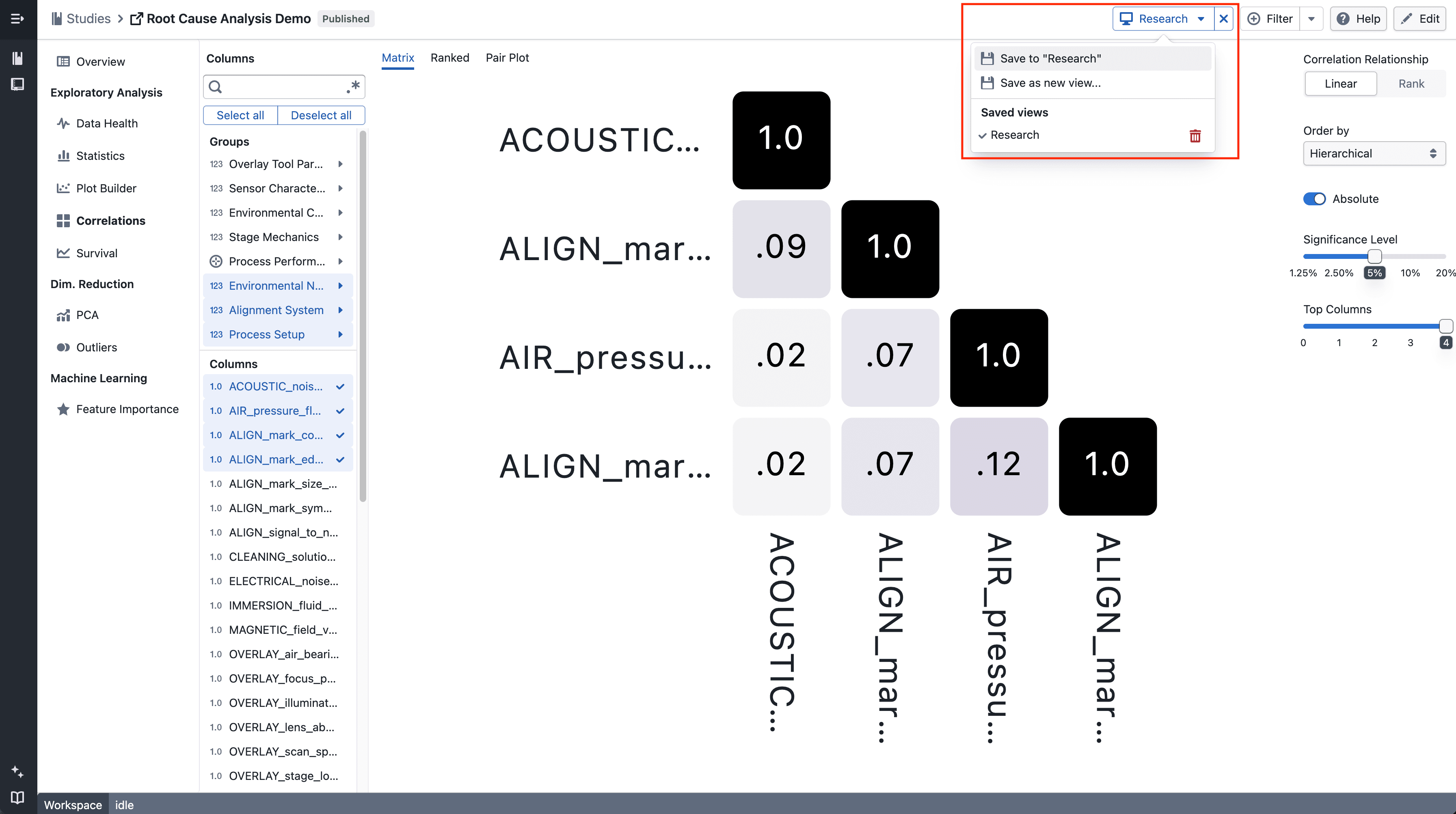
<p><img loading="lazy" alt="Adding correlation settings to an existing view" src="https://docs.catalyst.merckgroup.com/assets/images/correlations-save-existing-02c92a415e77440553194363cfd961ef.png" width="3586" height="2006"></p>
<ul>
<li class="">Each chart page (Plot Builder, Correlation Matrix, Correlation Ranked, Correlation Pair Plot) contributes its own configuration slot to a view</li>
<li class="">Use <strong>Save to "[view name]"</strong> to add or update the current page's settings into the active view without overwriting the other slots</li>
<li class="">Navigate between charts and keep saving to build up a view that spans multiple chart types</li>
</ul>
<h3 class="anchor anchorTargetStickyNavbar_tleR" id="share-a-view">Share a view<a href="https://docs.catalyst.merckgroup.com/release-notes/2026/06/30/saved-views#share-a-view" class="hash-link" aria-label="Direct link to Share a view" title="Direct link to Share a view" translate="no">​</a></h3>
<ul>
<li class="">When a view is active, the URL contains a <code>?view=</code> parameter — copy and share it to let a colleague open the same configuration directly</li>
<li class="">Views are study-scoped, so the recipient must have access to the study</li>
</ul>
<hr>
<h2 class="anchor anchorTargetStickyNavbar_tleR" id="notes">Notes<a href="https://docs.catalyst.merckgroup.com/release-notes/2026/06/30/saved-views#notes" class="hash-link" aria-label="Direct link to Notes" title="Direct link to Notes" translate="no">​</a></h2>
<ul>
<li class="">Correlation tab settings (columns, colour) are saved independently per tab type, so Matrix, Ranked, and Pair Plot each have their own slot within a view</li>
<li class="">Clearing a view (the <strong>×</strong> button next to the Views menu) returns each chart to its default state; it does not delete the saved view</li>
<li class="">Views currently work for <strong>Plot Builder</strong> and <strong>Correlation</strong> only — support for PCA, Survival, and other chart types is coming soon</li>
<li class="">This is an incremental update during beta</li>
</ul>]]></content>
        <category label="New" term="New"/>
        <category label="Studies" term="Studies"/>
    </entry>
    <entry>
        <title type="html"><![CDATA[Assist Analyzes Your Study Data]]></title>
        <id>https://docs.catalyst.merckgroup.com/release-notes/2026/06/19/assist-analyzes-study-data</id>
        <link href="https://docs.catalyst.merckgroup.com/release-notes/2026/06/19/assist-analyzes-study-data"/>
        <updated>2026-06-19T00:00:00.000Z</updated>
        <summary type="html"><![CDATA[Catalyst Assist can now answer questions about the data in your study — counts, averages, distributions, and filtered breakdowns — by querying the dataset directly.]]></summary>
        <content type="html"><![CDATA[Catalyst Assist can now answer questions about the data in your study — counts, averages, distributions, and filtered breakdowns — by querying the dataset directly.<!-- -->
<hr>
<h2 class="anchor anchorTargetStickyNavbar_tleR" id="whats-included">What's included<a href="https://docs.catalyst.merckgroup.com/release-notes/2026/06/19/assist-analyzes-study-data#whats-included" class="hash-link" aria-label="Direct link to What's included" title="Direct link to What's included" translate="no">​</a></h2>
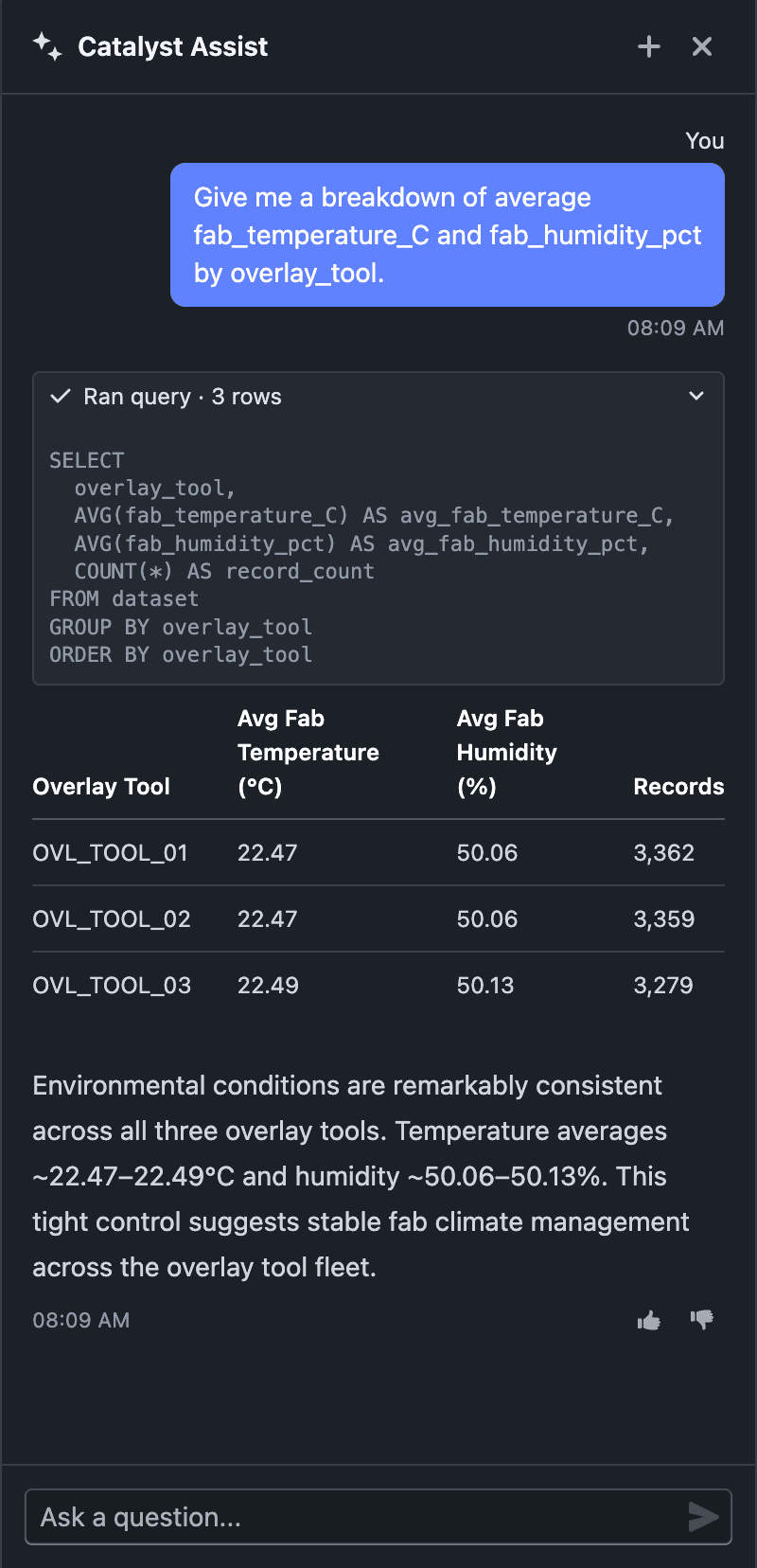
<p><img loading="lazy" alt="Catalyst Assist answering a data question with figures and a table" src="https://docs.catalyst.merckgroup.com/assets/images/assist-study-data-071fb21a837aa858cf2bde9624b289de.png" width="800" height="1656"></p>
<ul>
<li class="">Ask data questions in natural language — "average overlay error by tool?", "how many wafers failed process control?", "distribution of risk score by lot" — and Assist queries your study dataset to answer</li>
<li class="">Answers are computed from your actual data, returned as markdown tables, with a brief takeaway drawn from the results</li>
<li class="">Date and duration math is supported — group by year, compare timestamps, measure elapsed time between events</li>
<li class="">Platform and feature questions still work exactly as before — Assist picks the right mode for each question</li>
</ul>
<hr>
<h2 class="anchor anchorTargetStickyNavbar_tleR" id="notes">Notes<a href="https://docs.catalyst.merckgroup.com/release-notes/2026/06/19/assist-analyzes-study-data#notes" class="hash-link" aria-label="Direct link to Notes" title="Direct link to Notes" translate="no">​</a></h2>
<ul>
<li class="">Data answers come only from your dataset — Assist never invents, estimates, or extrapolates figures</li>
<li class="">Data questions are available when Assist is opened from within a study</li>
<li class="">Data queries run on the study's worker, so it must be provisioned and active; otherwise Assist still answers platform and feature questions but can't query the dataset</li>
<li class="">AI responses may not always be accurate. If you receive an unexpected result, let us know with the thumbs up/down on the response, or share it via <strong>Support → Contact Support</strong></li>
<li class="">This is an incremental update during beta</li>
</ul>]]></content>
        <category label="Enhancement" term="Enhancement"/>
        <category label="Studies" term="Studies"/>
    </entry>
    <entry>
        <title type="html"><![CDATA[Improved Folder Picker]]></title>
        <id>https://docs.catalyst.merckgroup.com/release-notes/2026/06/11/improved-folder-picker</id>
        <link href="https://docs.catalyst.merckgroup.com/release-notes/2026/06/11/improved-folder-picker"/>
        <updated>2026-06-11T00:00:00.000Z</updated>
        <summary type="html"><![CDATA[The folder picker is now easier to navigate, supports deeper search drill-down, and lets you create folders in the right place.]]></summary>
        <content type="html"><![CDATA[The folder picker is now easier to navigate, supports deeper search drill-down, and lets you create folders in the right place.<!-- -->
<hr>
<h2 class="anchor anchorTargetStickyNavbar_tleR" id="whats-included">What’s included<a href="https://docs.catalyst.merckgroup.com/release-notes/2026/06/11/improved-folder-picker#whats-included" class="hash-link" aria-label="Direct link to What’s included" title="Direct link to What’s included" translate="no">​</a></h2>
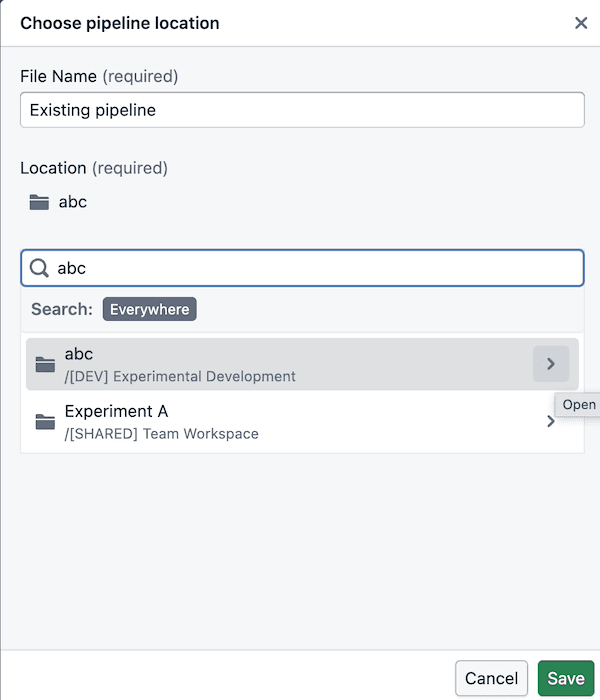
<h3 class="anchor anchorTargetStickyNavbar_tleR" id="easier-folder-navigation">Easier folder navigation<a href="https://docs.catalyst.merckgroup.com/release-notes/2026/06/11/improved-folder-picker#easier-folder-navigation" class="hash-link" aria-label="Direct link to Easier folder navigation" title="Direct link to Easier folder navigation" translate="no">​</a></h3>
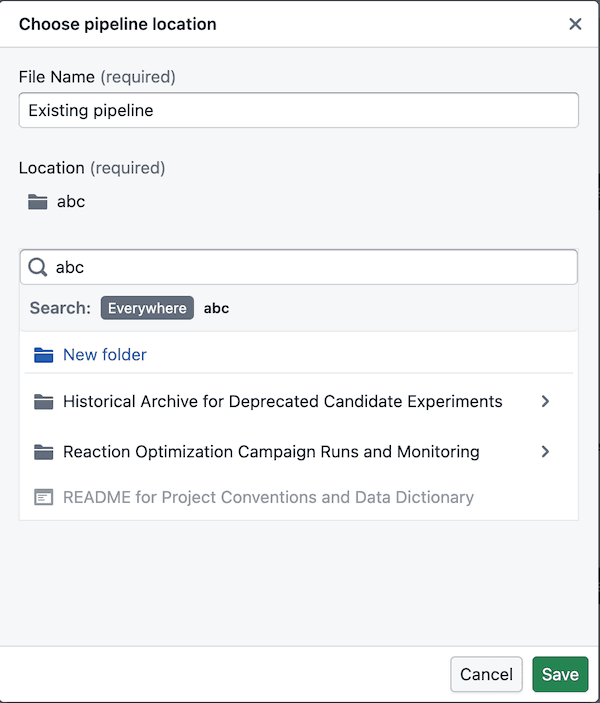
<p><img loading="lazy" alt="Search folder navigation" src="https://docs.catalyst.merckgroup.com/assets/images/search-folder-navigation-e066e80afc1fac809fcf8ddca6966568.png" width="600" height="700">
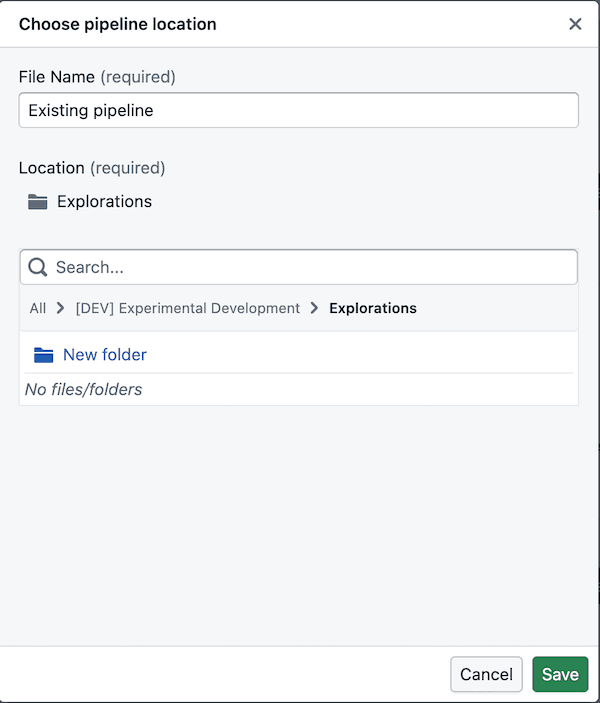
<img loading="lazy" alt="Search folder navigation creation" src="https://docs.catalyst.merckgroup.com/assets/images/search-folder-creation-5592dc1315c105405a1e6b1ab68af2c7.png" width="600" height="703"></p>
<ul>
<li class="">You can now drill into folders directly from search results instead of starting over in the main tree</li>
<li class="">Search breadcrumbs stay clickable, so it’s easier to move back up when you’ve drilled in</li>
<li class="">Search results only show folders you can actually use, so there’s less dead-end clicking</li>
</ul>
<h3 class="anchor anchorTargetStickyNavbar_tleR" id="folder-creation-in-the-right-place">Folder creation in the right place<a href="https://docs.catalyst.merckgroup.com/release-notes/2026/06/11/improved-folder-picker#folder-creation-in-the-right-place" class="hash-link" aria-label="Direct link to Folder creation in the right place" title="Direct link to Folder creation in the right place" translate="no">​</a></h3>
<p><img loading="lazy" alt="Folder creation" src="https://docs.catalyst.merckgroup.com/assets/images/folder-creation-490eb596dd5fde8734f381f00ef99715.png" width="600" height="703"></p>
<ul>
<li class="">The picker follows the same folder structure used in Foundry: <strong>space -&gt; project -&gt; folders</strong></li>
<li class="">A <strong>space</strong> is like a shared drive, and its first-level listings are project resources</li>
<li class=""><strong>Admins</strong> manage projects, so you can browse into them but cannot create new folders at the project level itself</li>
<li class="">You can create folders once you’re inside the folders within a project, including after drilling in from search</li>
</ul>
<hr>
<h2 class="anchor anchorTargetStickyNavbar_tleR" id="notes">Notes<a href="https://docs.catalyst.merckgroup.com/release-notes/2026/06/11/improved-folder-picker#notes" class="hash-link" aria-label="Direct link to Notes" title="Direct link to Notes" translate="no">​</a></h2>
<ul>
<li class="">Folder creation is only available once you’ve drilled into a valid folder location inside a project</li>
<li class="">If a folder does not appear in search, you may not have permission to use it</li>
</ul>]]></content>
        <category label="Enhancement" term="Enhancement"/>
        <category label="Platform" term="Platform"/>
    </entry>
    <entry>
        <title type="html"><![CDATA[Catalyst Assist]]></title>
        <id>https://docs.catalyst.merckgroup.com/release-notes/2026/05/11/catalyst-assist</id>
        <link href="https://docs.catalyst.merckgroup.com/release-notes/2026/05/11/catalyst-assist"/>
        <updated>2026-05-11T00:00:00.000Z</updated>
        <summary type="html"><![CDATA[Ask questions about Catalyst and get instant, documentation-backed answers — right from the sidebar.]]></summary>
        <content type="html"><![CDATA[Ask questions about Catalyst and get instant, documentation-backed answers — right from the sidebar.<!-- -->
<hr>
<h2 class="anchor anchorTargetStickyNavbar_tleR" id="whats-included">What's included<a href="https://docs.catalyst.merckgroup.com/release-notes/2026/05/11/catalyst-assist#whats-included" class="hash-link" aria-label="Direct link to What's included" title="Direct link to What's included" translate="no">​</a></h2>
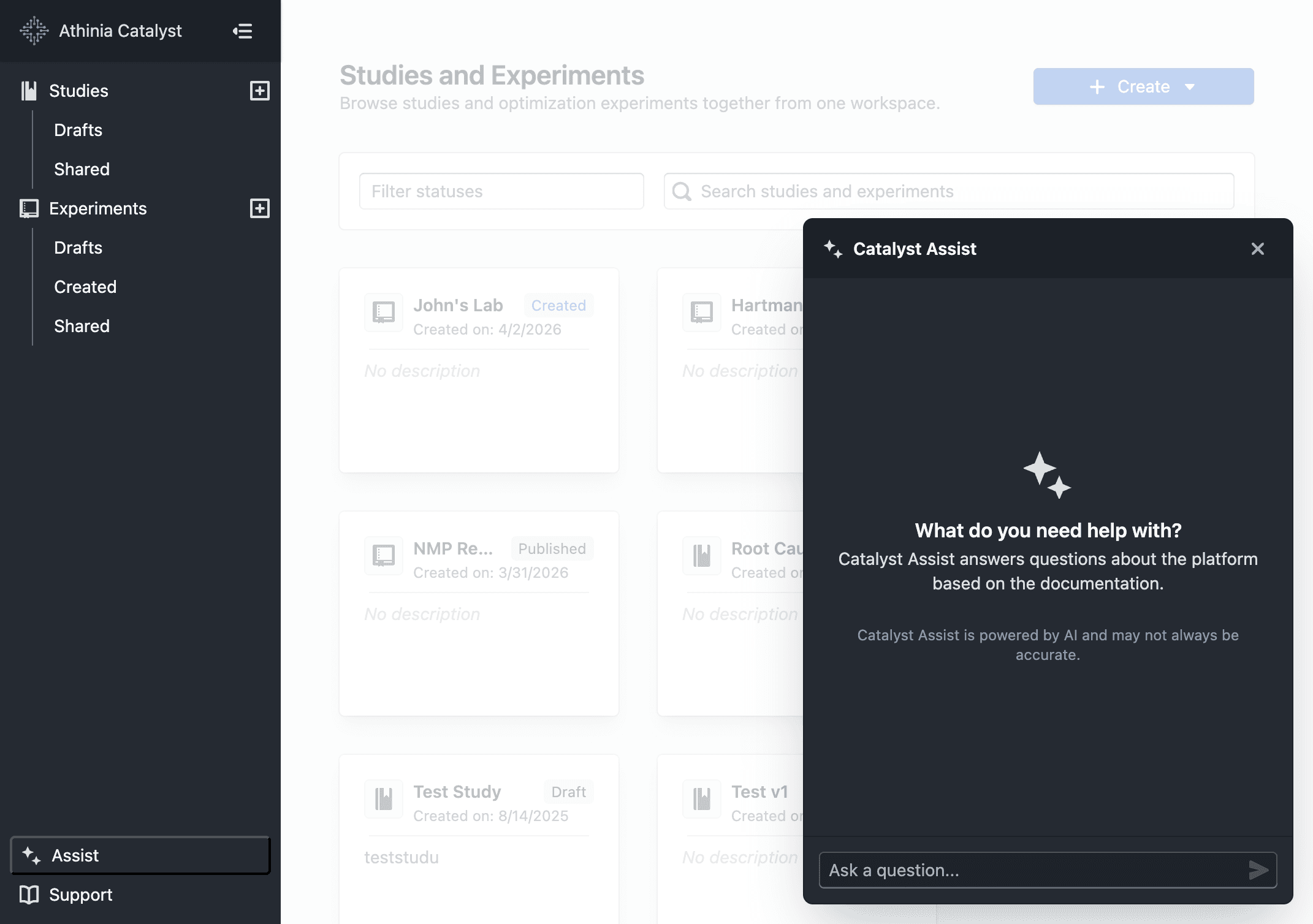
<p><img loading="lazy" alt="Catalyst Assist panel open alongside the dashboard" src="https://docs.catalyst.merckgroup.com/assets/images/catalyst-assist-ba4088cb49df0dbb357d1ebc6d2a8e94.png" width="2142" height="1508"></p>
<ul>
<li class="">Click <strong>Assist</strong> in the sidebar to open the panel from any page</li>
<li class="">Ask a question and receive a focused, markdown-formatted answer grounded in Catalyst documentation</li>
<li class="">Source excerpts are shown beneath each reply so you can verify or explore further</li>
<li class="">Follow-up questions are supported — prior context is carried forward within the same conversation</li>
<li class="">Use the <strong>+</strong> button to start a new conversation at any time</li>
</ul>
<hr>
<h2 class="anchor anchorTargetStickyNavbar_tleR" id="notes">Notes<a href="https://docs.catalyst.merckgroup.com/release-notes/2026/05/11/catalyst-assist#notes" class="hash-link" aria-label="Direct link to Notes" title="Direct link to Notes" translate="no">​</a></h2>
<ul>
<li class="">Answers are based solely on Catalyst documentation — the assistant will not speculate or invent features</li>
<li class="">AI responses may not always be accurate. When in doubt, refer to the <a class="" href="https://docs.catalyst.merckgroup.com/">official documentation</a> for authoritative guidance</li>
<li class="">If you receive an unexpected or unhelpful response, please share it via <strong>Support → Contact Support</strong></li>
<li class="">Conversations are limited to 20 messages; start a new one for unrelated topics</li>
</ul>]]></content>
        <category label="New" term="New"/>
        <category label="Platform" term="Platform"/>
    </entry>
    <entry>
        <title type="html"><![CDATA[Sigma-Based PCA Clusters]]></title>
        <id>https://docs.catalyst.merckgroup.com/release-notes/2026/05/07/pca-sigma-clusters</id>
        <link href="https://docs.catalyst.merckgroup.com/release-notes/2026/05/07/pca-sigma-clusters"/>
        <updated>2026-05-07T00:00:00.000Z</updated>
        <summary type="html"><![CDATA[Create PCA clusters from sigma bands and compare only clusters that contain points.]]></summary>
        <content type="html"><![CDATA[Create PCA clusters from sigma bands and compare only clusters that contain points.<!-- -->
<hr>
<h2 class="anchor anchorTargetStickyNavbar_tleR" id="whats-included">What's included<a href="https://docs.catalyst.merckgroup.com/release-notes/2026/05/07/pca-sigma-clusters#whats-included" class="hash-link" aria-label="Direct link to What's included" title="Direct link to What's included" translate="no">​</a></h2>
<h3 class="anchor anchorTargetStickyNavbar_tleR" id="create-clusters-from-sigma-bands">Create clusters from sigma bands<a href="https://docs.catalyst.merckgroup.com/release-notes/2026/05/07/pca-sigma-clusters#create-clusters-from-sigma-bands" class="hash-link" aria-label="Direct link to Create clusters from sigma bands" title="Direct link to Create clusters from sigma bands" translate="no">​</a></h3>
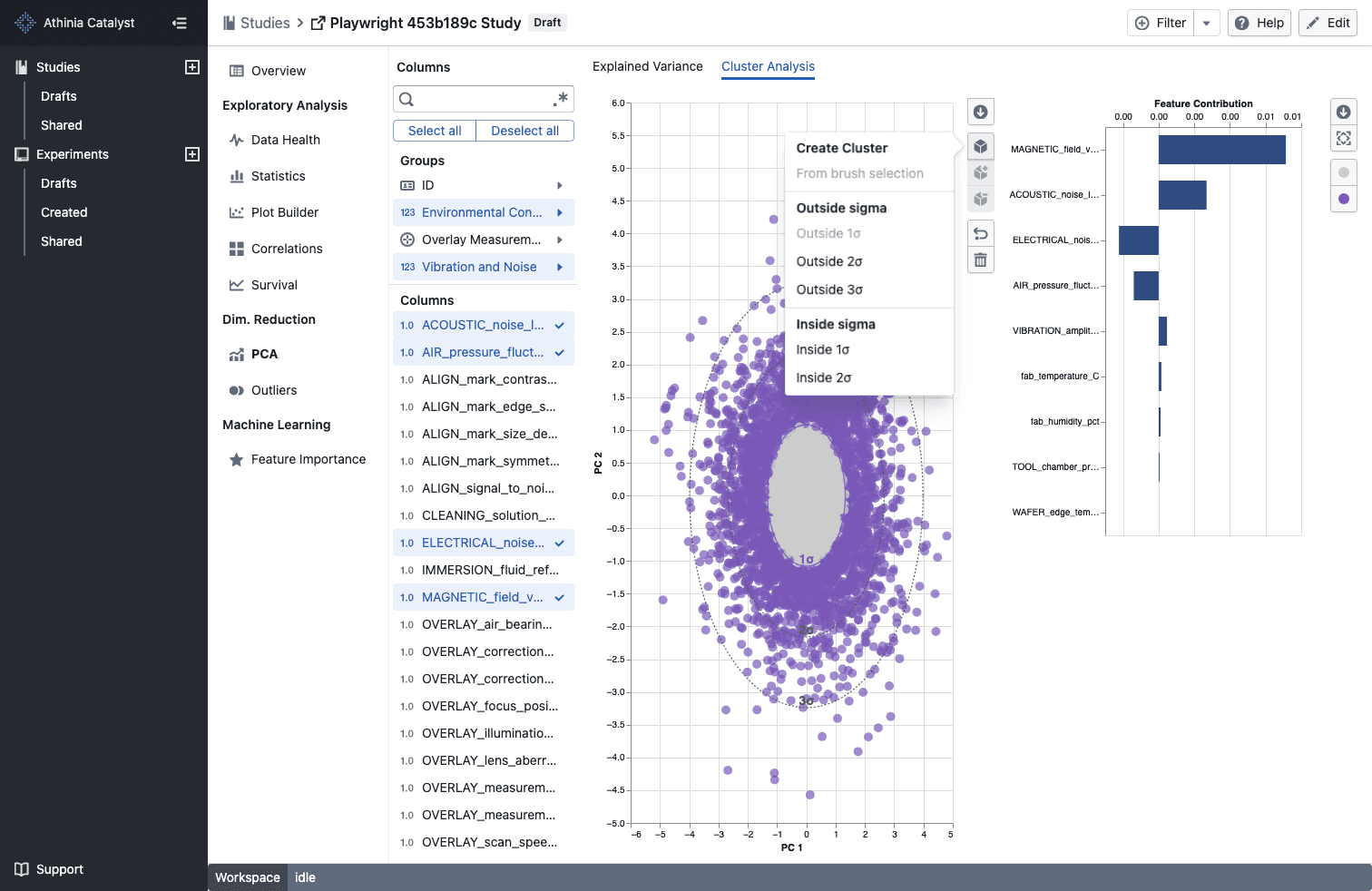
<p><img loading="lazy" alt="Sigma-based PCA clusters" src="https://docs.catalyst.merckgroup.com/assets/images/pca-sigma-clusters-4994f22401136eb390ba2c04abd48f41.png" width="1512" height="982"></p>
<ul>
<li class="">Open the cluster menu in <strong>PCA -&gt; Cluster Analysis</strong> to create ready-made <strong>Inside nσ</strong> and <strong>Outside nσ</strong> clusters without drawing a brush</li>
<li class="">Sigma-based clusters automatically assign matching points as soon as the PCA view finishes loading</li>
<li class="">The matching sigma contour adopts the cluster color so you can see the selected boundary at a glance</li>
</ul>
<hr>
<h3 class="anchor anchorTargetStickyNavbar_tleR" id="compare-populated-clusters-only">Compare populated clusters only<a href="https://docs.catalyst.merckgroup.com/release-notes/2026/05/07/pca-sigma-clusters#compare-populated-clusters-only" class="hash-link" aria-label="Direct link to Compare populated clusters only" title="Direct link to Compare populated clusters only" translate="no">​</a></h3>
<ul>
<li class="">Cluster comparison menus now show only clusters that currently contain points</li>
<li class="">If a selected cluster becomes empty or is removed, the comparison updates to the next valid populated cluster automatically</li>
</ul>
<hr>
<h2 class="anchor anchorTargetStickyNavbar_tleR" id="notes">Notes<a href="https://docs.catalyst.merckgroup.com/release-notes/2026/05/07/pca-sigma-clusters#notes" class="hash-link" aria-label="Direct link to Notes" title="Direct link to Notes" translate="no">​</a></h2>
<ul>
<li class="">Sigma-based clusters are stored with your other PCA cluster selections for that study</li>
<li class=""><strong>Outside nσ</strong> options are available for every displayed sigma band, while <strong>Inside nσ</strong> options are available for the inner bands</li>
<li class="">Empty clusters are excluded from comparison choices until they contain points</li>
</ul>]]></content>
        <category label="Enhancement" term="Enhancement"/>
        <category label="Studies" term="Studies"/>
        <category label="PCA" term="PCA"/>
    </entry>
    <entry>
        <title type="html"><![CDATA[Contact Support]]></title>
        <id>https://docs.catalyst.merckgroup.com/release-notes/2026/05/05/contact-support</id>
        <link href="https://docs.catalyst.merckgroup.com/release-notes/2026/05/05/contact-support"/>
        <updated>2026-05-05T00:00:00.000Z</updated>
        <summary type="html"><![CDATA[Send feedback, bug reports, and feature requests directly from the Support menu.]]></summary>
        <content type="html"><![CDATA[Send feedback, bug reports, and feature requests directly from the Support menu.<!-- -->
<hr>
<h2 class="anchor anchorTargetStickyNavbar_tleR" id="whats-included">What's included<a href="https://docs.catalyst.merckgroup.com/release-notes/2026/05/05/contact-support#whats-included" class="hash-link" aria-label="Direct link to What's included" title="Direct link to What's included" translate="no">​</a></h2>
<h3 class="anchor anchorTargetStickyNavbar_tleR" id="contact-support-from-anywhere">Contact Support from anywhere<a href="https://docs.catalyst.merckgroup.com/release-notes/2026/05/05/contact-support#contact-support-from-anywhere" class="hash-link" aria-label="Direct link to Contact Support from anywhere" title="Direct link to Contact Support from anywhere" translate="no">​</a></h3>
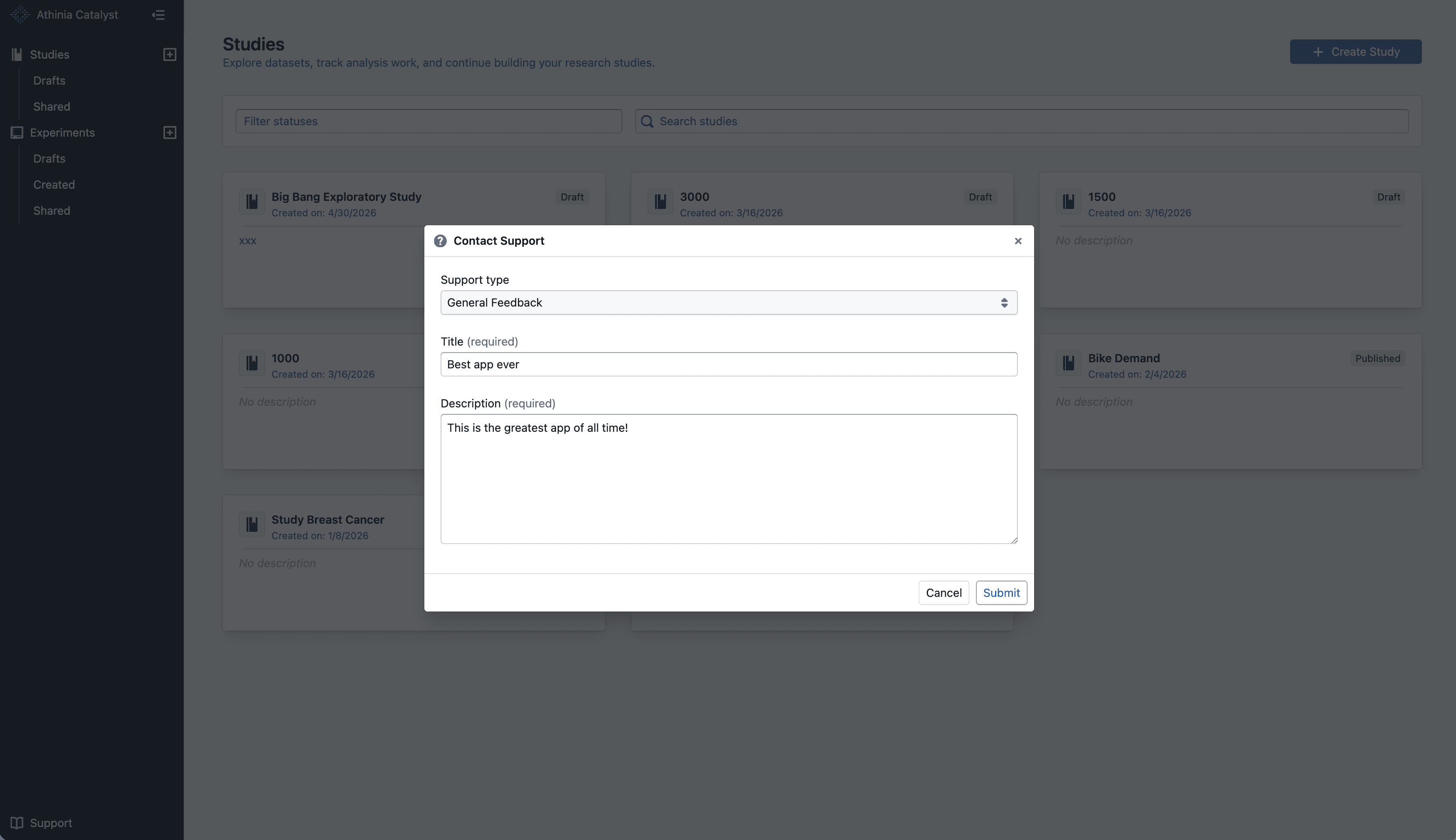
<p><img loading="lazy" alt="Contact Support dialog" src="https://docs.catalyst.merckgroup.com/assets/images/contact-support-106aba07412135502a8735cbc3de6ccb.png" width="3582" height="2066"></p>
<ul>
<li class="">Open <strong>Support -&gt; Contact Support</strong> from the app sidebar without leaving your current page</li>
<li class="">Submit one of three request types: <strong>General Feedback</strong>, <strong>Bug Report</strong>, or <strong>Feature Request</strong></li>
</ul>
<hr>
<h3 class="anchor anchorTargetStickyNavbar_tleR" id="faster-issue-triage">Faster issue triage<a href="https://docs.catalyst.merckgroup.com/release-notes/2026/05/05/contact-support#faster-issue-triage" class="hash-link" aria-label="Direct link to Faster issue triage" title="Direct link to Faster issue triage" translate="no">​</a></h3>
<ul>
<li class="">Add a clear title and detailed description so the team can understand your request faster</li>
<li class="">Your submission includes your current page, browser, and account details to reduce back-and-forth</li>
</ul>
<hr>
<h2 class="anchor anchorTargetStickyNavbar_tleR" id="notes">Notes<a href="https://docs.catalyst.merckgroup.com/release-notes/2026/05/05/contact-support#notes" class="hash-link" aria-label="Direct link to Notes" title="Direct link to Notes" translate="no">​</a></h2>
<ul>
<li class="">The form requires both a title and description before you can submit</li>
<li class="">Messages are limited to 1,500 characters</li>
<li class="">For bug reports, include steps to reproduce and what you expected to happen</li>
</ul>]]></content>
        <category label="New" term="New"/>
        <category label="Platform" term="Platform"/>
    </entry>
    <entry>
        <title type="html"><![CDATA[Exclude Columns in Data Health & Column Settings]]></title>
        <id>https://docs.catalyst.merckgroup.com/release-notes/2026/04/30/filter-dropped-column-in-datahealth</id>
        <link href="https://docs.catalyst.merckgroup.com/release-notes/2026/04/30/filter-dropped-column-in-datahealth"/>
        <updated>2026-04-30T00:00:00.000Z</updated>
        <summary type="html"><![CDATA[Excluded columns are now hidden by default in the Data Health summary, and both the Data Health and Column Settings pages show a consistent "Hide excluded (N)" filter.]]></summary>
        <content type="html"><![CDATA[Excluded columns are now hidden by default in the Data Health summary, and both the Data Health and Column Settings pages show a consistent "Hide excluded (N)" filter.<!-- -->
<hr>
<h2 class="anchor anchorTargetStickyNavbar_tleR" id="whats-included">What's included<a href="https://docs.catalyst.merckgroup.com/release-notes/2026/04/30/filter-dropped-column-in-datahealth#whats-included" class="hash-link" aria-label="Direct link to What's included" title="Direct link to What's included" translate="no">​</a></h2>
<h3 class="anchor anchorTargetStickyNavbar_tleR" id="standardized-exclude-action">Standardized "Exclude" action<a href="https://docs.catalyst.merckgroup.com/release-notes/2026/04/30/filter-dropped-column-in-datahealth#standardized-exclude-action" class="hash-link" aria-label="Direct link to Standardized &quot;Exclude&quot; action" title="Direct link to Standardized &quot;Exclude&quot; action" translate="no">​</a></h3>
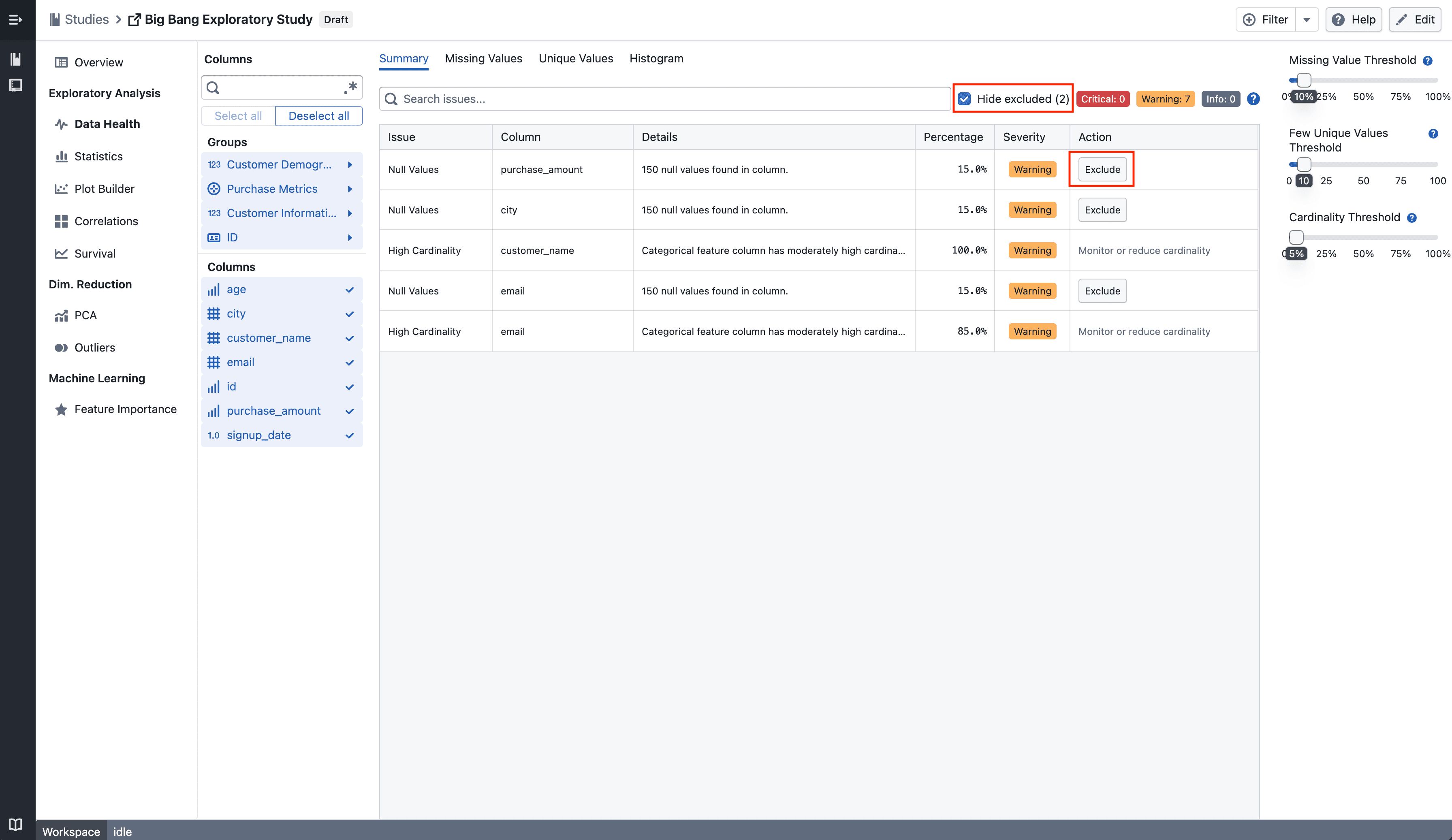
<p><img loading="lazy" alt="Summary" src="https://docs.catalyst.merckgroup.com/assets/images/summary-fdd634e082c9beb936a0f67dda3e92f0.png" width="3584" height="2074"></p>
<p>The action previously labeled <strong>Drop column</strong> in the Data Health table is now labeled <strong>Exclude</strong>, consistent with the terminology used in Column Settings.
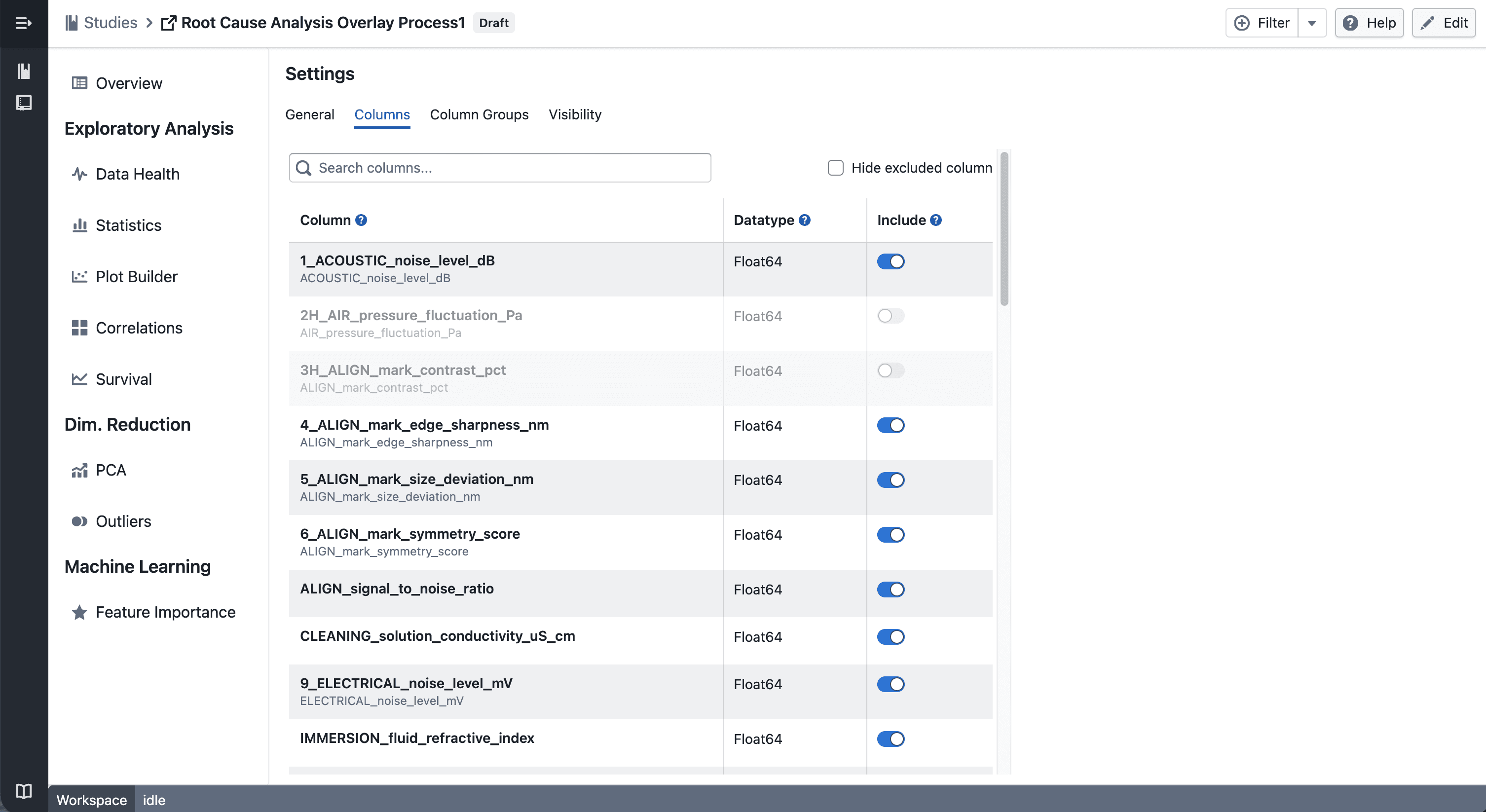
Excluded columns (visibility offs) are now hidden by default in the Data Health summary table. A <strong>Hide excluded (N)</strong> checkbox appears in the toolbar whenever there are excluded columns, allowing you to reveal them when needed.</p>
<h3 class="anchor anchorTargetStickyNavbar_tleR" id="consistent-filter-in-column-settings">Consistent filter in Column Settings<a href="https://docs.catalyst.merckgroup.com/release-notes/2026/04/30/filter-dropped-column-in-datahealth#consistent-filter-in-column-settings" class="hash-link" aria-label="Direct link to Consistent filter in Column Settings" title="Direct link to Consistent filter in Column Settings" translate="no">​</a></h3>
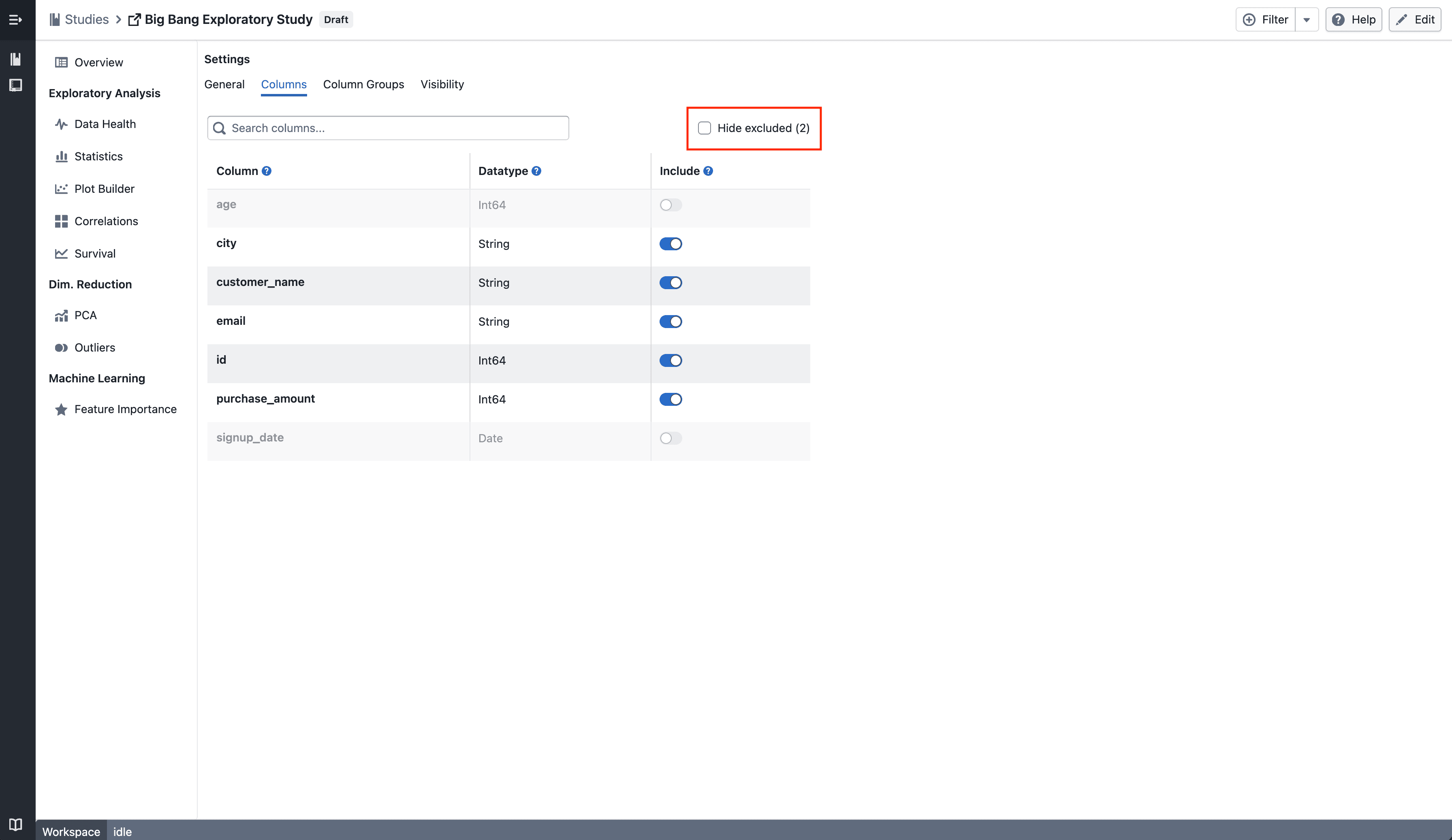
<p><img loading="lazy" alt="Column Edit" src="https://docs.catalyst.merckgroup.com/assets/images/column-edit-c1c699bcc5f1cd0790802870ac0b8df2.png" width="3584" height="2074"></p>
<p>The same <strong>Hide excluded (N)</strong> checkbox — showing the count of excluded columns — is now displayed in the Column Settings page, matching the behaviour in Data Health.</p>
<hr>
<h2 class="anchor anchorTargetStickyNavbar_tleR" id="notes">Notes<a href="https://docs.catalyst.merckgroup.com/release-notes/2026/04/30/filter-dropped-column-in-datahealth#notes" class="hash-link" aria-label="Direct link to Notes" title="Direct link to Notes" translate="no">​</a></h2>
<ul>
<li class="">Excluded columns are hidden, not deleted — your underlying data remains unchanged</li>
<li class="">The count in the checkbox reflects how many columns currently have visibility turned off</li>
<li class="">If you notice any unexpected behavior, please share steps to reproduce</li>
</ul>]]></content>
        <category label="New" term="New"/>
        <category label="Studies" term="Studies"/>
        <category label="Data Health" term="Data Health"/>
    </entry>
    <entry>
        <title type="html"><![CDATA[AI Summary for Plot Builder]]></title>
        <id>https://docs.catalyst.merckgroup.com/release-notes/2026/04/27/ai-summary-plot-builder</id>
        <link href="https://docs.catalyst.merckgroup.com/release-notes/2026/04/27/ai-summary-plot-builder"/>
        <updated>2026-04-27T00:00:00.000Z</updated>
        <summary type="html"><![CDATA[Instantly understand any plot with an AI-generated summary — powered by an LLM with vision.]]></summary>
        <content type="html"><![CDATA[Instantly understand any plot with an AI-generated summary — powered by an LLM with vision.<!-- -->
<hr>
<h2 class="anchor anchorTargetStickyNavbar_tleR" id="whats-included">What's included<a href="https://docs.catalyst.merckgroup.com/release-notes/2026/04/27/ai-summary-plot-builder#whats-included" class="hash-link" aria-label="Direct link to What's included" title="Direct link to What's included" translate="no">​</a></h2>
<h3 class="anchor anchorTargetStickyNavbar_tleR" id="how-it-works">How it works<a href="https://docs.catalyst.merckgroup.com/release-notes/2026/04/27/ai-summary-plot-builder#how-it-works" class="hash-link" aria-label="Direct link to How it works" title="Direct link to How it works" translate="no">​</a></h3>
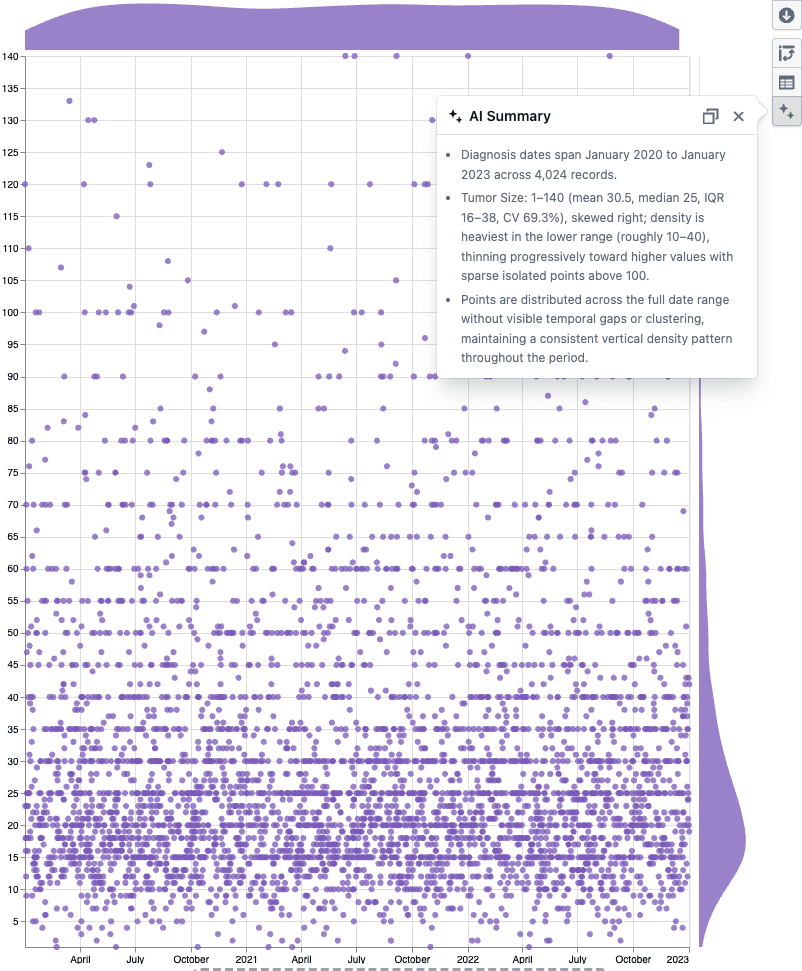
<p><img loading="lazy" alt="AI Summary popover on a scatter plot" src="https://docs.catalyst.merckgroup.com/assets/images/ai-summary-424c459e303cdd574139791340bfbdf7.png" width="802" height="971"></p>
<ul>
<li class="">Click the <strong>AI Summary</strong> button in the Plot Builder toolbar</li>
<li class="">A vision-enabled LLM reads the plot statistics and sees the chart, then returns bullet points covering distributions, group breakdowns, data quality issues, and visual patterns like clusters or outliers</li>
<li class="">Hit <strong>copy</strong> to paste the summary into a report or analysis note</li>
</ul>
<hr>
<h2 class="anchor anchorTargetStickyNavbar_tleR" id="notes">Notes<a href="https://docs.catalyst.merckgroup.com/release-notes/2026/04/27/ai-summary-plot-builder#notes" class="hash-link" aria-label="Direct link to Notes" title="Direct link to Notes" translate="no">​</a></h2>
<ul>
<li class="">Works with scatter plots, box plots, and heatmaps</li>
<li class="">The summary is factual only — the LLM does not assess or make recommendations</li>
<li class="">If you notice any unexpected behavior, please share steps to reproduce</li>
</ul>]]></content>
        <category label="New" term="New"/>
        <category label="Studies" term="Studies"/>
        <category label="Visualization" term="Visualization"/>
    </entry>
    <entry>
        <title type="html"><![CDATA[Column Management]]></title>
        <id>https://docs.catalyst.merckgroup.com/release-notes/2026/04/15/column-management</id>
        <link href="https://docs.catalyst.merckgroup.com/release-notes/2026/04/15/column-management"/>
        <updated>2026-04-15T00:00:00.000Z</updated>
        <summary type="html"><![CDATA[Rename and include or exclude columns across your study from Column Management.]]></summary>
        <content type="html"><![CDATA[Rename and include or exclude columns across your study from Column Management.<!-- -->
<hr>
<h2 class="anchor anchorTargetStickyNavbar_tleR" id="whats-included">What's included<a href="https://docs.catalyst.merckgroup.com/release-notes/2026/04/15/column-management#whats-included" class="hash-link" aria-label="Direct link to What's included" title="Direct link to What's included" translate="no">​</a></h2>
<h3 class="anchor anchorTargetStickyNavbar_tleR" id="column-management">Column Management<a href="https://docs.catalyst.merckgroup.com/release-notes/2026/04/15/column-management#column-management" class="hash-link" aria-label="Direct link to Column Management" title="Direct link to Column Management" translate="no">​</a></h3>
<p><img loading="lazy" alt="Column Management" src="https://docs.catalyst.merckgroup.com/assets/images/column-management-113844abecab606d4dbff757e1d7b193.png" width="3012" height="1646"></p>
<p>You can now manage columns from <strong>Edit → Columns</strong>.</p>
<ul>
<li class=""><strong>Exclude columns</strong> to remove them from all views in the study — including plots, statistics, and column groups</li>
<li class=""><strong>Include columns</strong> again at any time to restore them across the study</li>
</ul>
<hr>
<h3 class="anchor anchorTargetStickyNavbar_tleR" id="update-column">Update Column<a href="https://docs.catalyst.merckgroup.com/release-notes/2026/04/15/column-management#update-column" class="hash-link" aria-label="Direct link to Update Column" title="Direct link to Update Column" translate="no">​</a></h3>
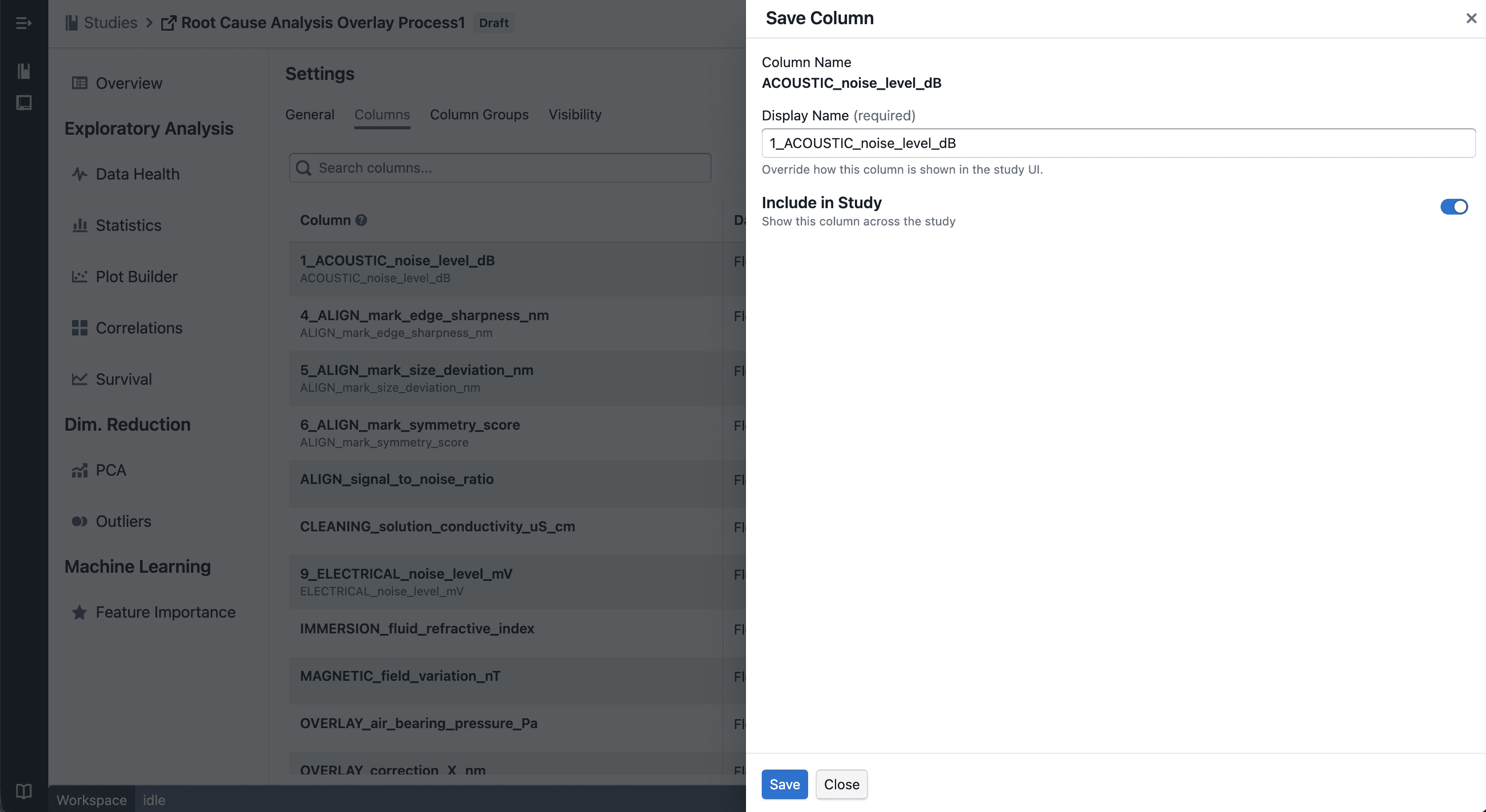
<p><img loading="lazy" alt="Drawer to update" src="https://docs.catalyst.merckgroup.com/assets/images/drawer-41e05c7377d4501d4d7113606eddf167.png" width="3012" height="1646"></p>
<ul>
<li class="">Rename columns to use more meaningful display names across your study</li>
<li class="">Changes are applied consistently across all views</li>
</ul>
<hr>
<h2 class="anchor anchorTargetStickyNavbar_tleR" id="notes">Notes<a href="https://docs.catalyst.merckgroup.com/release-notes/2026/04/15/column-management#notes" class="hash-link" aria-label="Direct link to Notes" title="Direct link to Notes" translate="no">​</a></h2>
<ul>
<li class="">Excluded columns are <strong>hidden, not deleted</strong> — your underlying data remains unchanged</li>
<li class="">Renaming affects <strong>display only</strong> and does not modify raw data</li>
<li class="">If you notice any unexpected behavior, please share steps to reproduce</li>
</ul>]]></content>
        <category label="New" term="New"/>
        <category label="Studies" term="Studies"/>
    </entry>
    <entry>
        <title type="html"><![CDATA[Desirability Convergence Chart]]></title>
        <id>https://docs.catalyst.merckgroup.com/release-notes/2026/04/10/optimization-convergence</id>
        <link href="https://docs.catalyst.merckgroup.com/release-notes/2026/04/10/optimization-convergence"/>
        <updated>2026-04-10T00:00:00.000Z</updated>
        <summary type="html"><![CDATA[New desirability convergence chart for tracking optimization progress across experiment trials.]]></summary>
        <content type="html"><![CDATA[New desirability convergence chart for tracking optimization progress across experiment trials.<!-- -->
<hr>
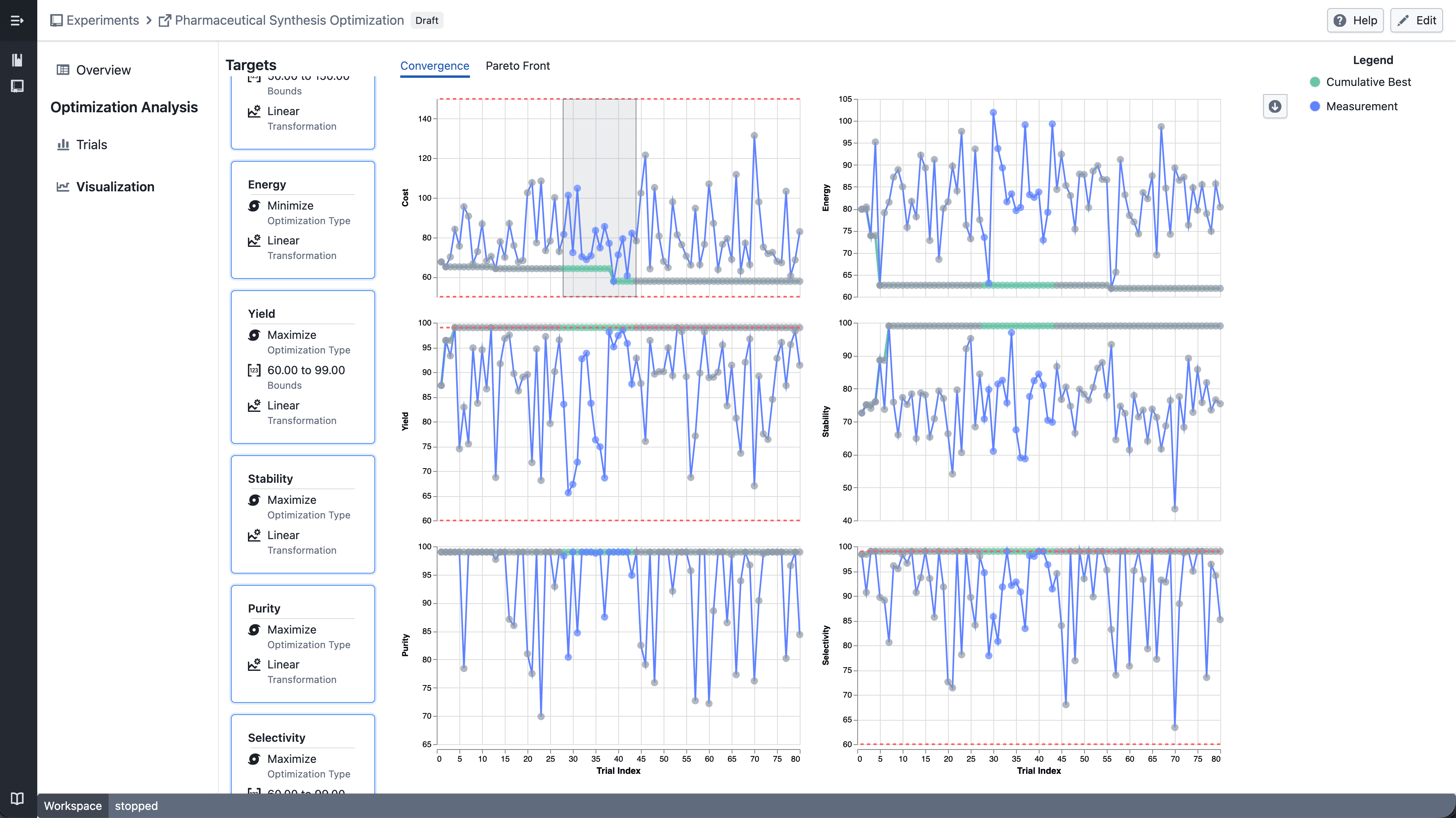
<h2 class="anchor anchorTargetStickyNavbar_tleR" id="whats-included">What's included<a href="https://docs.catalyst.merckgroup.com/release-notes/2026/04/10/optimization-convergence#whats-included" class="hash-link" aria-label="Direct link to What's included" title="Direct link to What's included" translate="no">​</a></h2>
<h3 class="anchor anchorTargetStickyNavbar_tleR" id="how-it-works">How it works<a href="https://docs.catalyst.merckgroup.com/release-notes/2026/04/10/optimization-convergence#how-it-works" class="hash-link" aria-label="Direct link to How it works" title="Direct link to How it works" translate="no">​</a></h3>
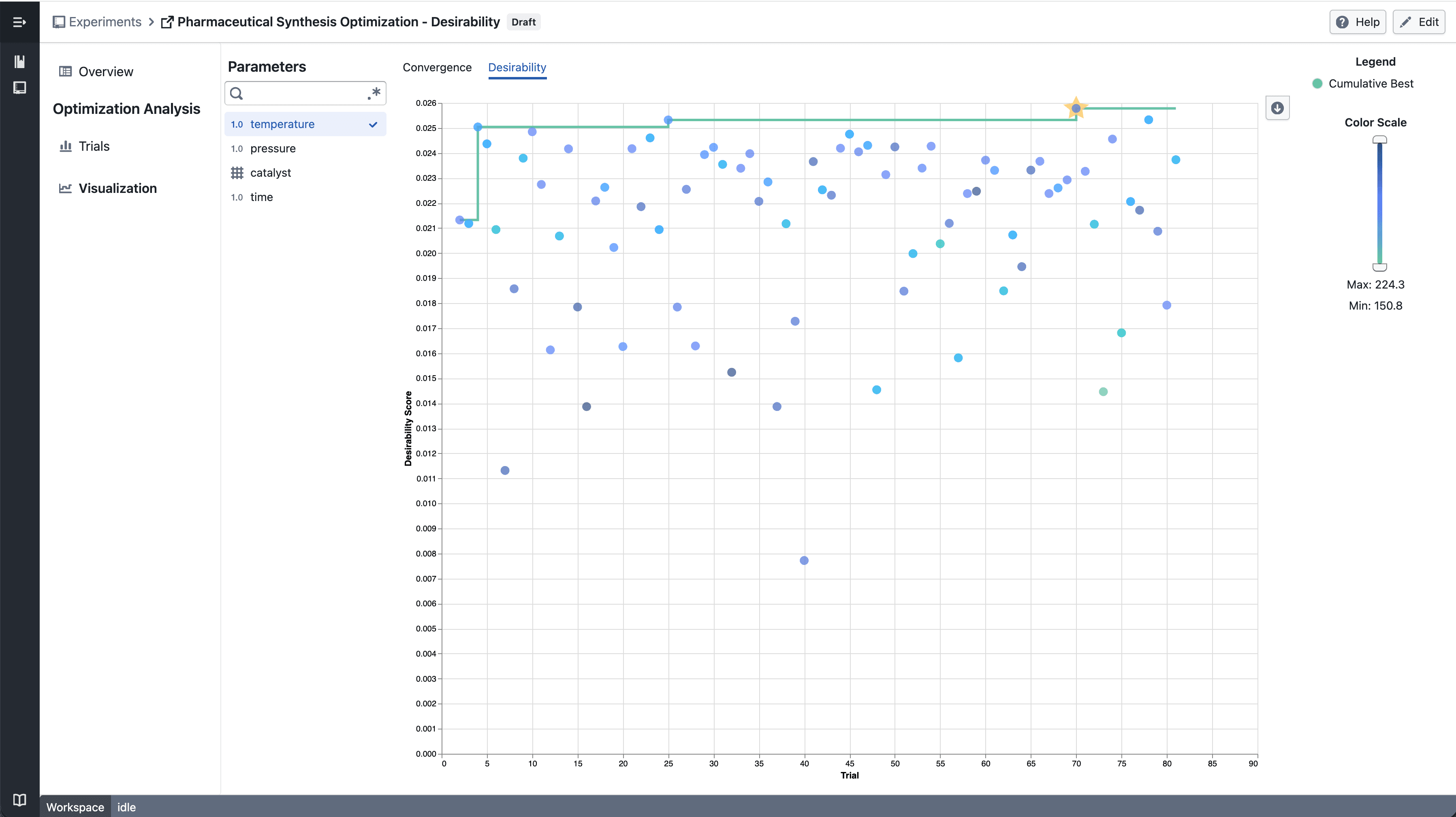
<p><img loading="lazy" alt="Numerical Parameter - select parameter" src="https://docs.catalyst.merckgroup.com/assets/images/numeric-parameter-cba0459247acdf6e3ccc18eb90a72262.png" width="3594" height="2016"></p>
<ul>
<li class="">Select a <strong>numerical parameter</strong> from the parameter sidebar to color data points by that parameter's value</li>
<li class="">A continuous color scale shows how parameter values relate to desirability scores across trials</li>
<li class="">The <strong>best so far</strong> line tracks the highest desirability achieved up to each trial</li>
</ul>
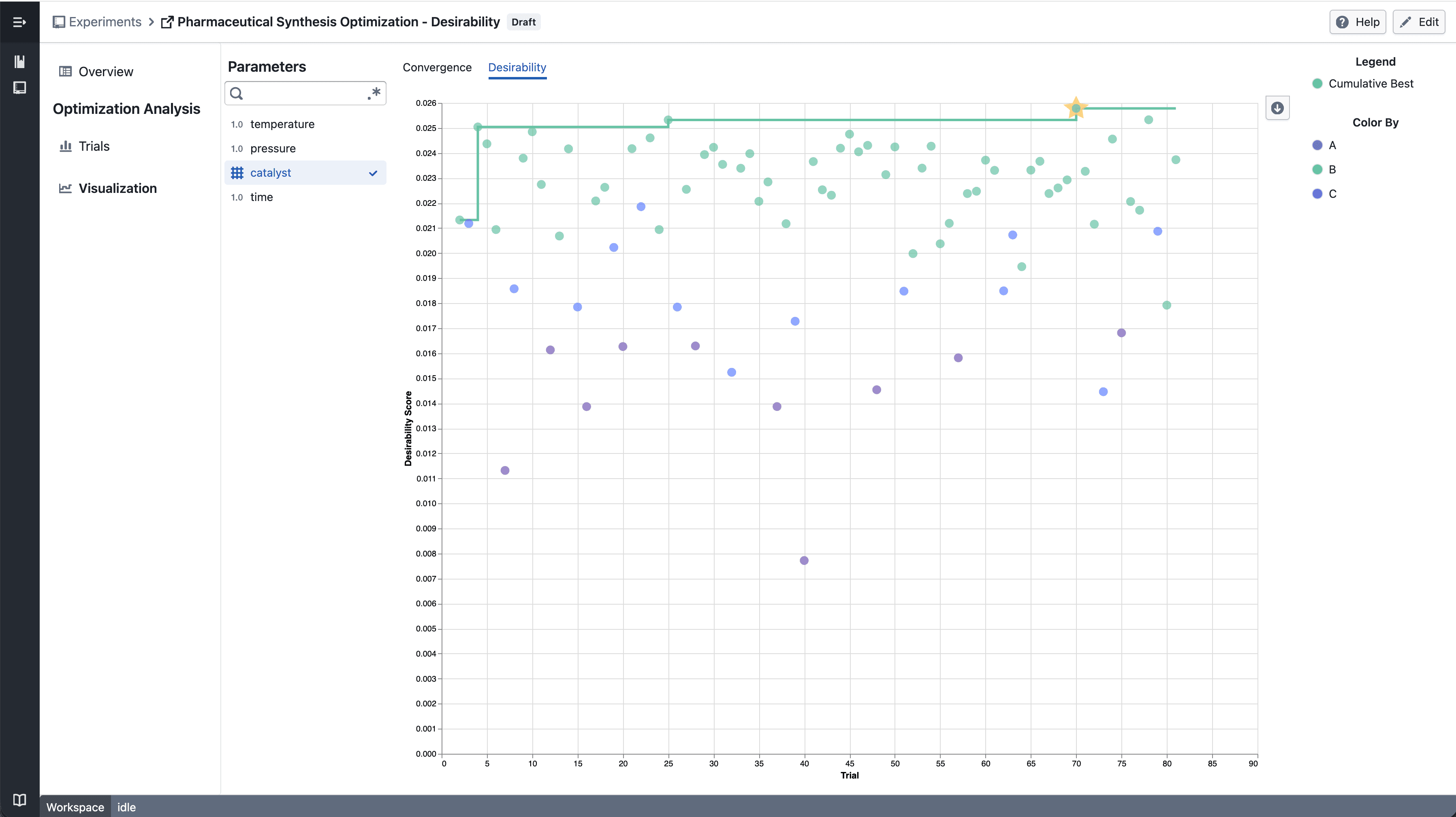
<p><img loading="lazy" alt="Categorical Parameter - select parameter" src="https://docs.catalyst.merckgroup.com/assets/images/categorical-parameter-12dbb2ef7e646ee566249bc9c247be2a.png" width="3594" height="2016"></p>
<ul>
<li class="">Select a <strong>categorical parameter</strong> to color data points by category</li>
<li class="">A discrete color legend identifies each category value</li>
</ul>
<hr>
<h2 class="anchor anchorTargetStickyNavbar_tleR" id="notes">Notes<a href="https://docs.catalyst.merckgroup.com/release-notes/2026/04/10/optimization-convergence#notes" class="hash-link" aria-label="Direct link to Notes" title="Direct link to Notes" translate="no">​</a></h2>
<ul>
<li class="">The convergence chart is available under the <strong>Desirability</strong> tab in the Visualization section</li>
<li class="">Chart interactions and layout may continue to evolve during the beta phase</li>
<li class="">If you notice any unexpected behavior, please share steps to reproduce</li>
</ul>]]></content>
        <category label="New" term="New"/>
        <category label="Experiments" term="Experiments"/>
        <category label="Visualization" term="Visualization"/>
    </entry>
    <entry>
        <title type="html"><![CDATA[Trellis plots in Experiment Visualization Convergence]]></title>
        <id>https://docs.catalyst.merckgroup.com/release-notes/2026/04/07/trellis-convergence</id>
        <link href="https://docs.catalyst.merckgroup.com/release-notes/2026/04/07/trellis-convergence"/>
        <updated>2026-04-07T00:00:00.000Z</updated>
        <summary type="html"><![CDATA[Split convergence plot into a multi-panel grid when multiple targets are selected.]]></summary>
        <content type="html"><![CDATA[Split convergence plot into a multi-panel grid when multiple targets are selected.<!-- -->
<hr>
<h2 class="anchor anchorTargetStickyNavbar_tleR" id="whats-included">What's included<a href="https://docs.catalyst.merckgroup.com/release-notes/2026/04/07/trellis-convergence#whats-included" class="hash-link" aria-label="Direct link to What's included" title="Direct link to What's included" translate="no">​</a></h2>
<h3 class="anchor anchorTargetStickyNavbar_tleR" id="how-it-works">How it works<a href="https://docs.catalyst.merckgroup.com/release-notes/2026/04/07/trellis-convergence#how-it-works" class="hash-link" aria-label="Direct link to How it works" title="Direct link to How it works" translate="no">​</a></h3>
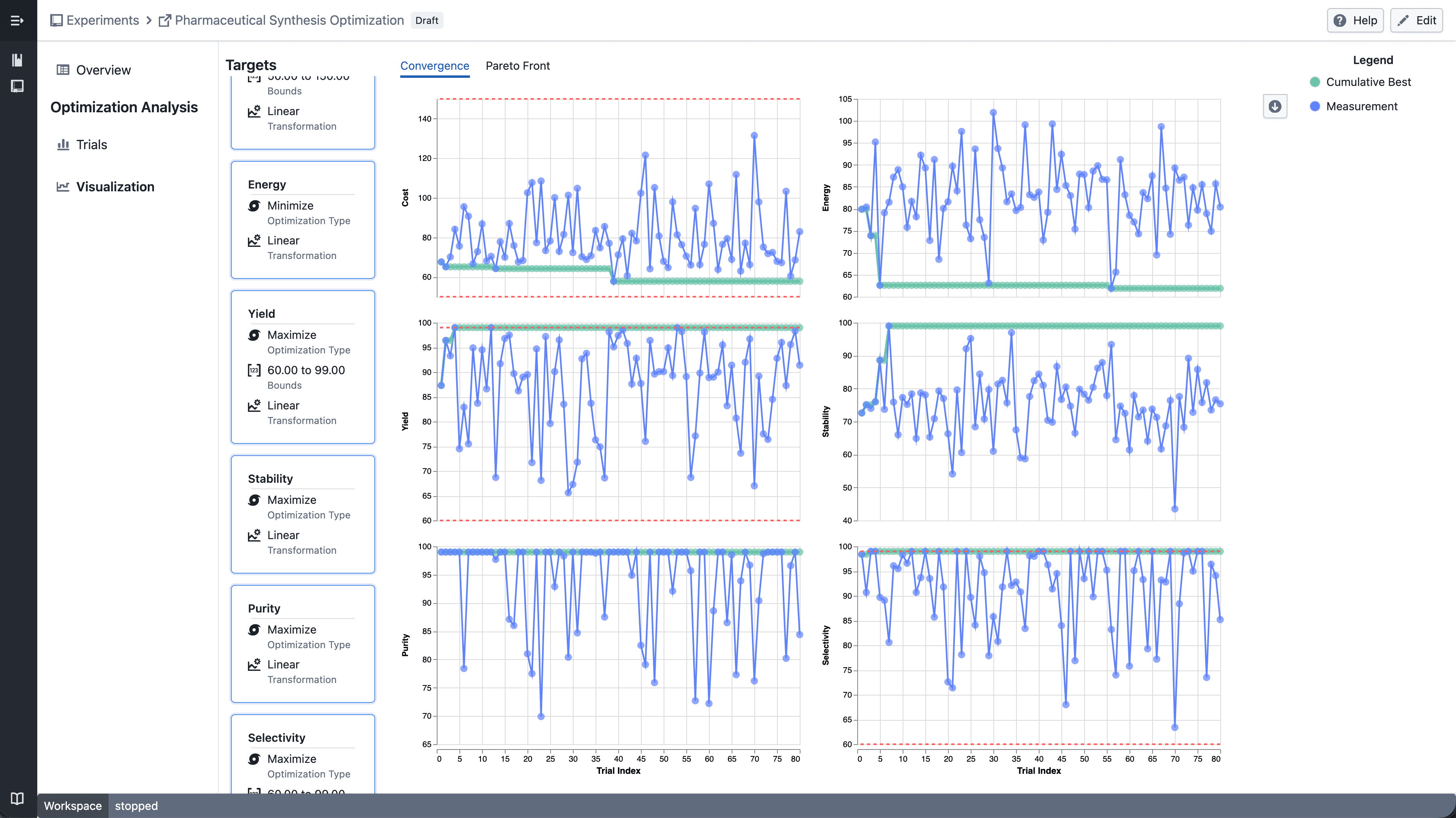
<p><img loading="lazy" alt="Trellis convergence plot" src="https://docs.catalyst.merckgroup.com/assets/images/trellis-convergence-d9c6fd4efc2a59f16a68fab306236056.png" width="3594" height="2018"></p>
<ul>
<li class="">Select <strong>multiple targets</strong> from the target sidebar</li>
<li class="">The convergence plot automatically splits into a grid — one panel per target</li>
<li class="">Each panel shares the same x-axis (iteration index) but has an independent y-axis scale</li>
</ul>
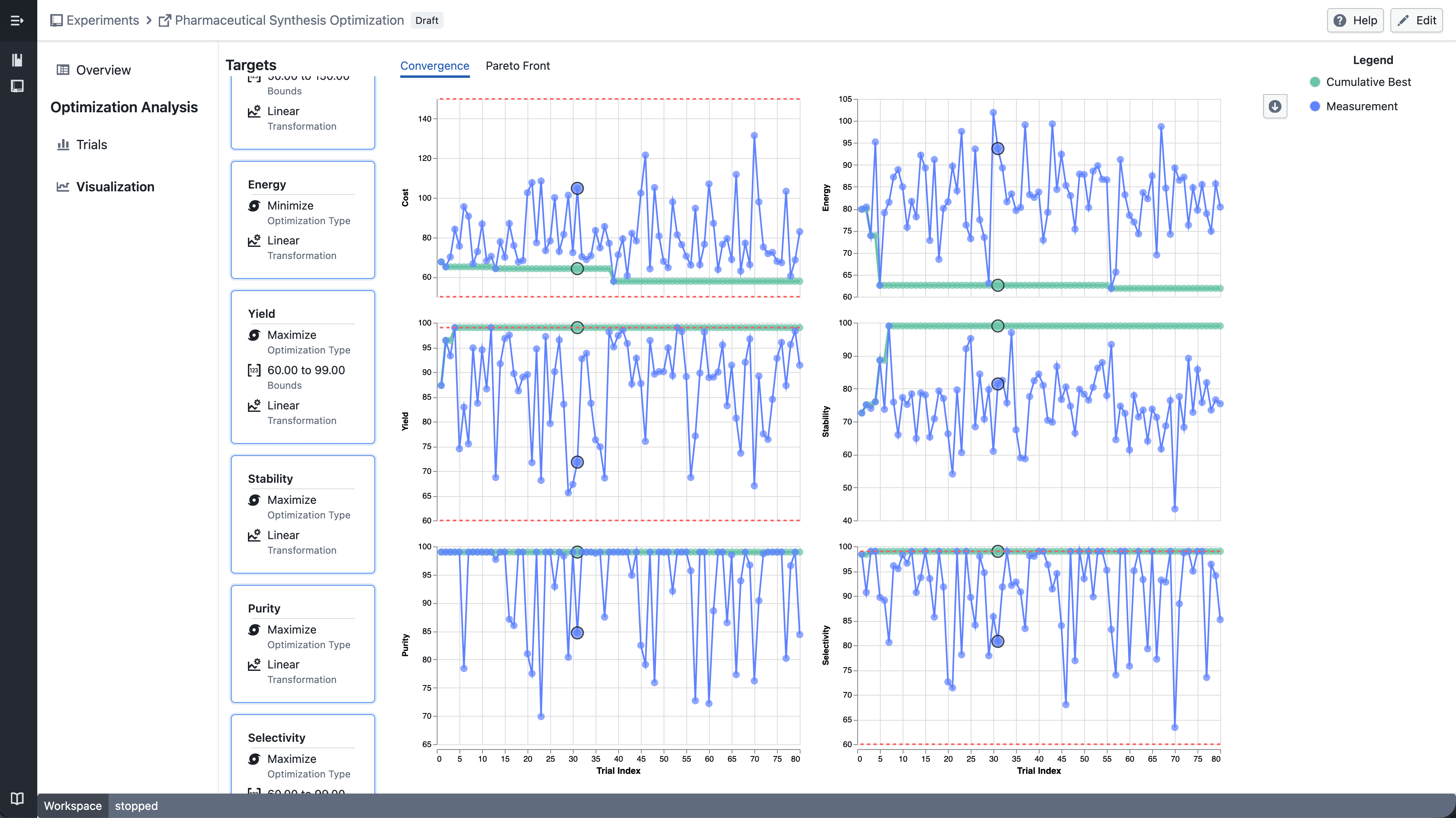
<p><img loading="lazy" alt="Trellis - select point" src="https://docs.catalyst.merckgroup.com/assets/images/select-point-4abed13c9c1d43adf3da56013f2f2188.png" width="3594" height="2018"></p>
<ul>
<li class=""><strong>Click</strong> a data point to highlight the corresponding trial across all panels</li>
</ul>
<p><img loading="lazy" alt="Trellis - draw point" src="https://docs.catalyst.merckgroup.com/assets/images/draw-point-5b5b38191d92c85c83db77911038fcf2.png" width="3594" height="2018"></p>
<ul>
<li class=""><strong>Shift-drag</strong> to draw a brush selection across panels</li>
<li class="">Points outside the selection are dimmed</li>
<li class="">Up to <strong>6 targets</strong> can be displayed at a time</li>
</ul>
<hr>
<h2 class="anchor anchorTargetStickyNavbar_tleR" id="notes">Notes<a href="https://docs.catalyst.merckgroup.com/release-notes/2026/04/07/trellis-convergence#notes" class="hash-link" aria-label="Direct link to Notes" title="Direct link to Notes" translate="no">​</a></h2>
<ul>
<li class="">Single target selection continues to show the standard convergence plot</li>
<li class="">Trellis layout and interactions may continue to evolve during the beta phase</li>
<li class="">If you notice any unexpected behavior, please share steps to reproduce</li>
</ul>]]></content>
        <category label="New" term="New"/>
        <category label="Experiments" term="Experiments"/>
        <category label="Visualization" term="Visualization"/>
    </entry>
    <entry>
        <title type="html"><![CDATA[Drop Column in Data Health]]></title>
        <id>https://docs.catalyst.merckgroup.com/release-notes/2026/04/01/data-health-drop-column</id>
        <link href="https://docs.catalyst.merckgroup.com/release-notes/2026/04/01/data-health-drop-column"/>
        <updated>2026-04-01T00:00:00.000Z</updated>
        <summary type="html"><![CDATA[You can now drop columns directly from the Data Health table. Dropped columns are hidden across all study views and the change is saved automatically.]]></summary>
        <content type="html"><![CDATA[You can now drop columns directly from the Data Health table. Dropped columns are hidden across all study views and the change is saved automatically.<!-- -->
<hr>
<h2 class="anchor anchorTargetStickyNavbar_tleR" id="whats-included">What's included<a href="https://docs.catalyst.merckgroup.com/release-notes/2026/04/01/data-health-drop-column#whats-included" class="hash-link" aria-label="Direct link to What's included" title="Direct link to What's included" translate="no">​</a></h2>
<h3 class="anchor anchorTargetStickyNavbar_tleR" id="drop-column">Drop Column<a href="https://docs.catalyst.merckgroup.com/release-notes/2026/04/01/data-health-drop-column#drop-column" class="hash-link" aria-label="Direct link to Drop Column" title="Direct link to Drop Column" translate="no">​</a></h3>
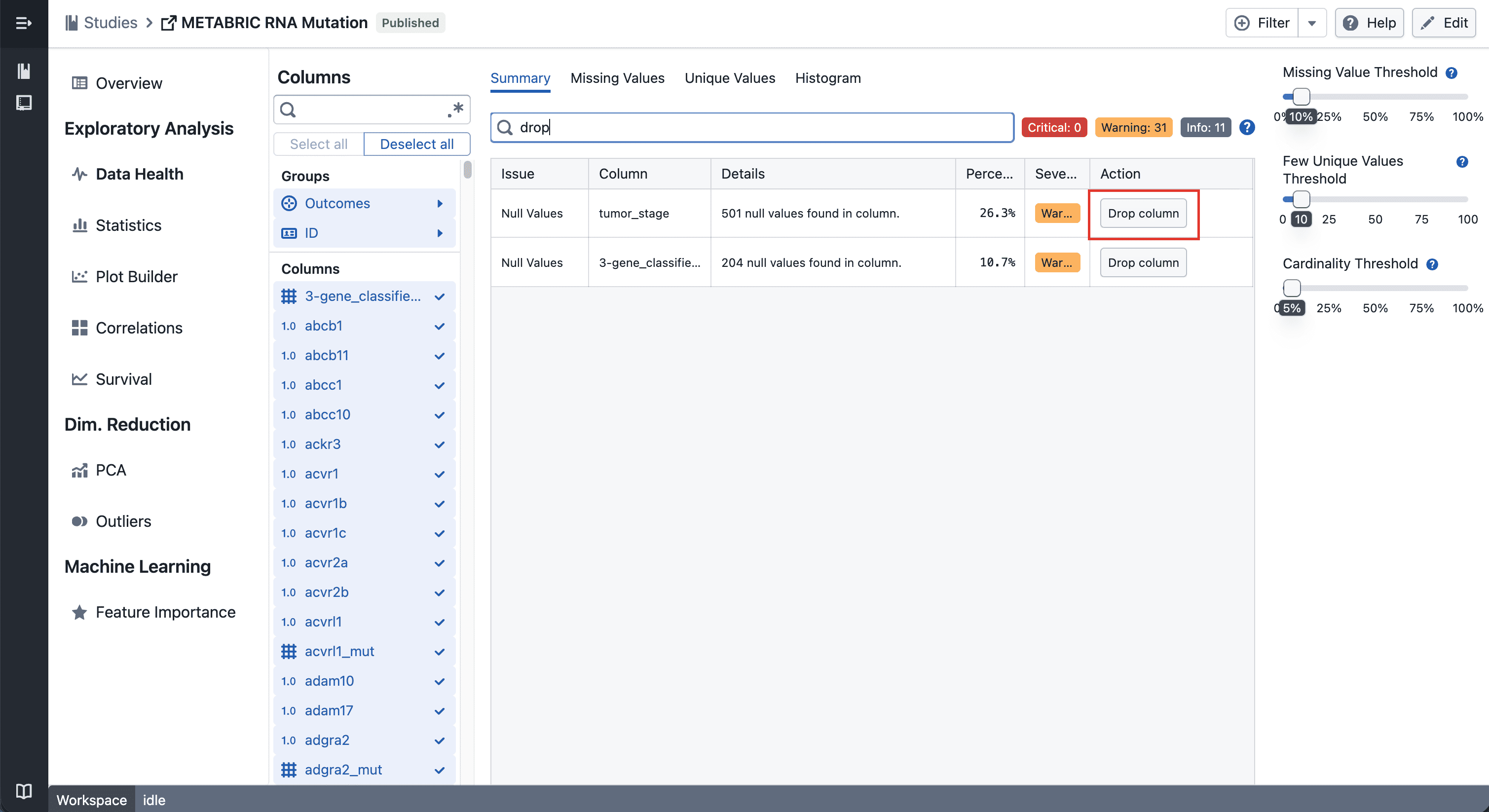
<p><img loading="lazy" alt="Drop Column Button" src="https://docs.catalyst.merckgroup.com/assets/images/drop-column-884b263d39db52adedfadb1e71942b48.png" width="3018" height="1646"></p>
<p>Click the drop button on any row in the Data Health table to hide that column across all views in the study — plots, statistics, and column groups included.</p>
<h3 class="anchor anchorTargetStickyNavbar_tleR" id="undo">Undo<a href="https://docs.catalyst.merckgroup.com/release-notes/2026/04/01/data-health-drop-column#undo" class="hash-link" aria-label="Direct link to Undo" title="Direct link to Undo" translate="no">​</a></h3>
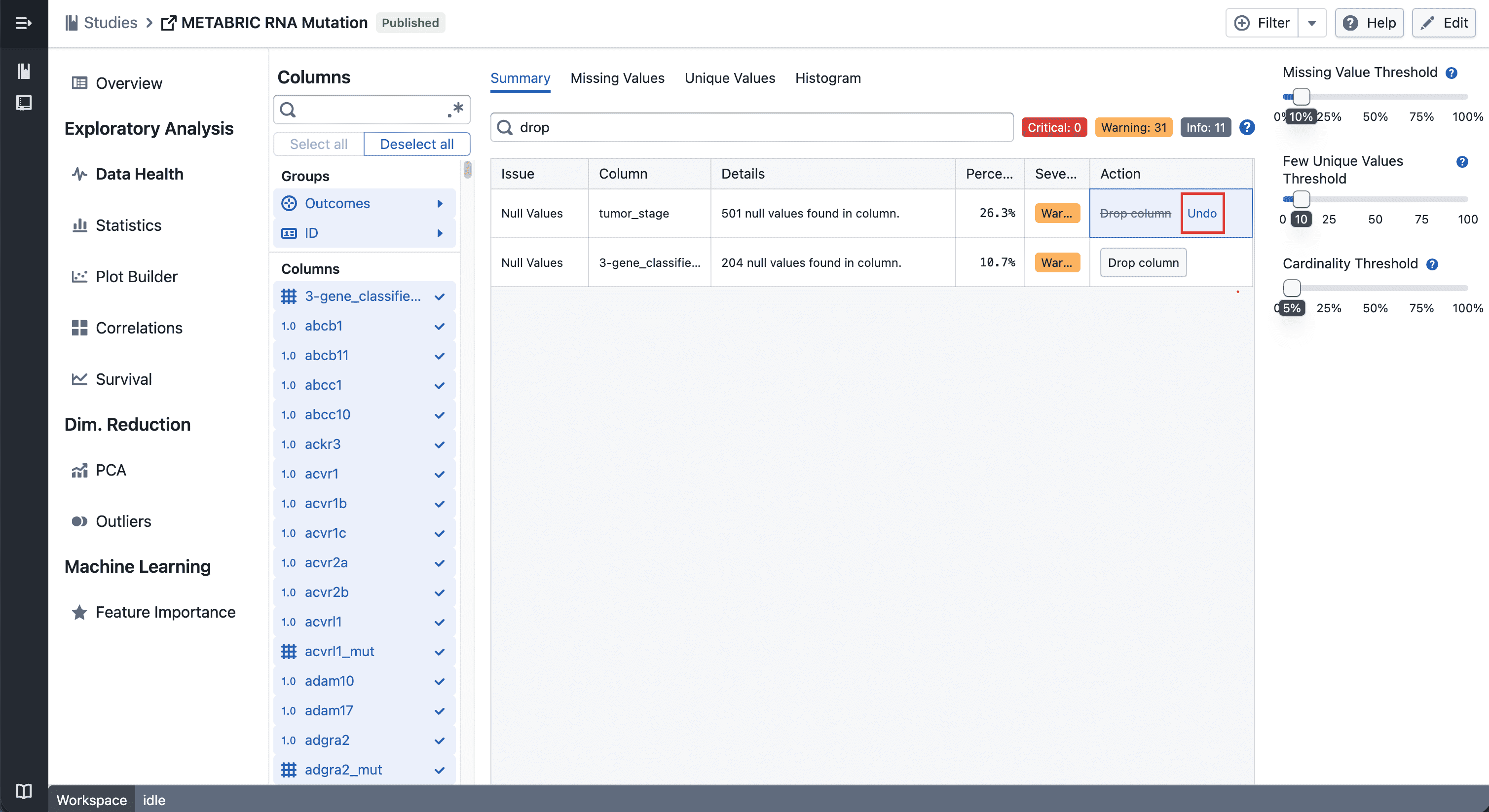
<p><img loading="lazy" alt="Undo Drop Column Button" src="https://docs.catalyst.merckgroup.com/assets/images/undo-272b2e04f41190f5b8daa7ec77ec9421.png" width="3018" height="1646"></p>
<p>Changed your mind? Hit the undo button on the same row to bring the column back instantly.</p>
<hr>
<h2 class="anchor anchorTargetStickyNavbar_tleR" id="notes">Notes<a href="https://docs.catalyst.merckgroup.com/release-notes/2026/04/01/data-health-drop-column#notes" class="hash-link" aria-label="Direct link to Notes" title="Direct link to Notes" translate="no">​</a></h2>
<ul>
<li class="">Dropped columns are hidden, not deleted — your data stays intact</li>
<li class="">If you notice any unexpected behavior, please share steps to reproduce</li>
</ul>]]></content>
        <category label="New" term="New"/>
        <category label="Studies" term="Studies"/>
        <category label="Data Health" term="Data Health"/>
    </entry>
    <entry>
        <title type="html"><![CDATA[Multi-Evaluation Navigation in Feature Importance]]></title>
        <id>https://docs.catalyst.merckgroup.com/release-notes/2026/03/25/feature-importance-filter-navigation</id>
        <link href="https://docs.catalyst.merckgroup.com/release-notes/2026/03/25/feature-importance-filter-navigation"/>
        <updated>2026-03-25T00:00:00.000Z</updated>
        <summary type="html"><![CDATA[Navigate between historical model evaluations in Feature Importance.]]></summary>
        <content type="html"><![CDATA[Navigate between historical model evaluations in Feature Importance.<!-- -->
<hr>
<h2 class="anchor anchorTargetStickyNavbar_tleR" id="whats-included">What's included<a href="https://docs.catalyst.merckgroup.com/release-notes/2026/03/25/feature-importance-filter-navigation#whats-included" class="hash-link" aria-label="Direct link to What's included" title="Direct link to What's included" translate="no">​</a></h2>
<h3 class="anchor anchorTargetStickyNavbar_tleR" id="how-it-works">How it works<a href="https://docs.catalyst.merckgroup.com/release-notes/2026/03/25/feature-importance-filter-navigation#how-it-works" class="hash-link" aria-label="Direct link to How it works" title="Direct link to How it works" translate="no">​</a></h3>
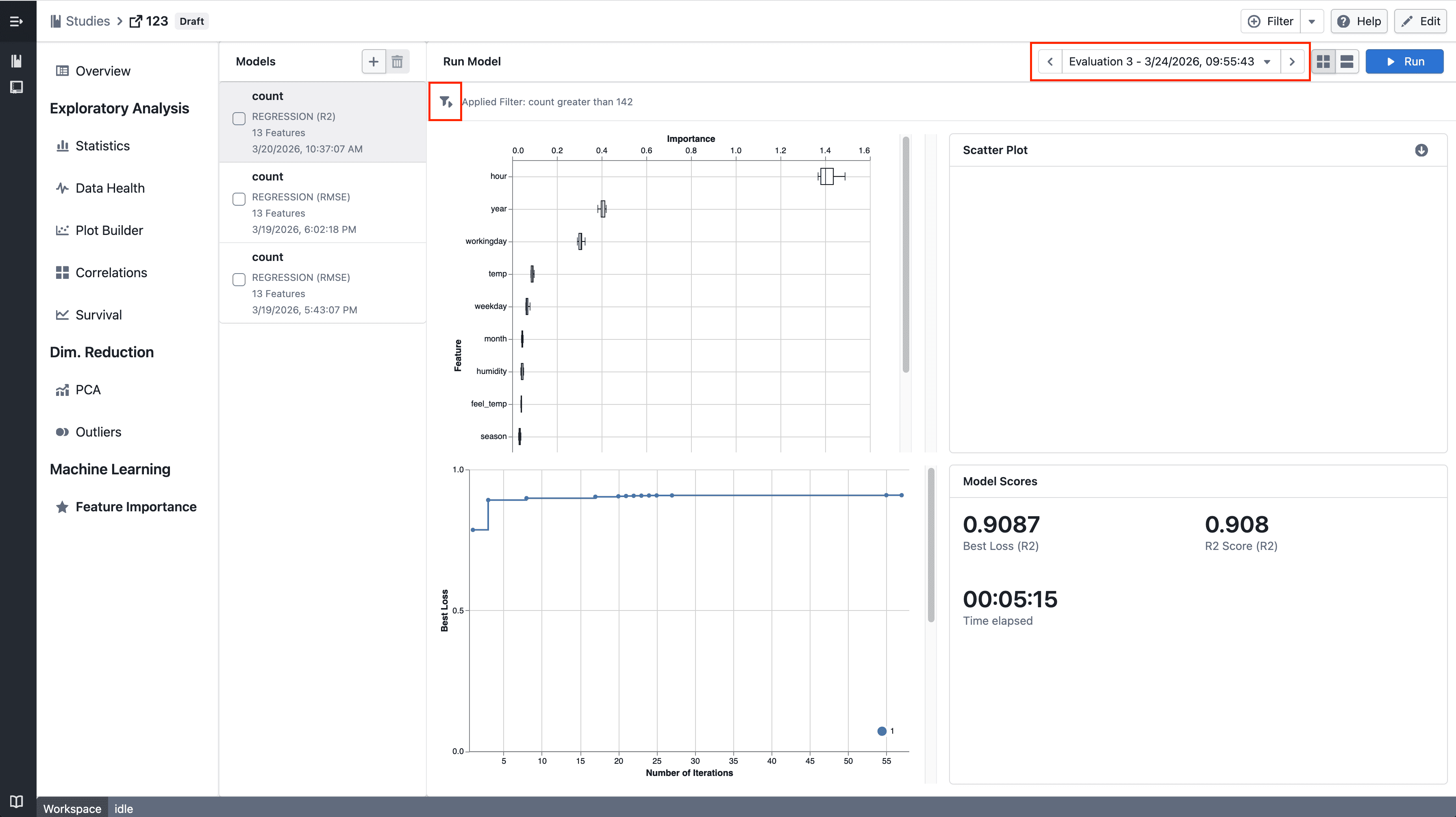
<p><img loading="lazy" alt="Feature Importance" src="https://docs.catalyst.merckgroup.com/assets/images/filter-and-navigation-165b6357545ae26f77308c87e258e2f3.png" width="3582" height="2010"></p>
<ul>
<li class="">Step through historical model evaluations using the new navigation controls</li>
<li class="">The latest evaluation remains the default when no selection is made</li>
<li class="">Quickly reapply filters across views for consistent analysis</li>
</ul>
<hr>
<h2 class="anchor anchorTargetStickyNavbar_tleR" id="notes">Notes<a href="https://docs.catalyst.merckgroup.com/release-notes/2026/03/25/feature-importance-filter-navigation#notes" class="hash-link" aria-label="Direct link to Notes" title="Direct link to Notes" translate="no">​</a></h2>
<ul>
<li class="">If you notice any unexpected behavior, please share steps to reproduce</li>
</ul>]]></content>
        <category label="New" term="New"/>
        <category label="Studies" term="Studies"/>
        <category label="Feature Importance" term="Feature Importance"/>
    </entry>
    <entry>
        <title type="html"><![CDATA[Trellis plots in Plot Builder]]></title>
        <id>https://docs.catalyst.merckgroup.com/release-notes/2026/03/17/trellis-plot-builder</id>
        <link href="https://docs.catalyst.merckgroup.com/release-notes/2026/03/17/trellis-plot-builder"/>
        <updated>2026-03-17T00:00:00.000Z</updated>
        <summary type="html"><![CDATA[Split scatter plots and box plots into a multi-panel grid by any categorical column to compare patterns across groups side by side.]]></summary>
        <content type="html"><![CDATA[Split scatter plots and box plots into a multi-panel grid by any categorical column to compare patterns across groups side by side.<!-- -->
<hr>
<h2 class="anchor anchorTargetStickyNavbar_tleR" id="whats-included">What's included<a href="https://docs.catalyst.merckgroup.com/release-notes/2026/03/17/trellis-plot-builder#whats-included" class="hash-link" aria-label="Direct link to What's included" title="Direct link to What's included" translate="no">​</a></h2>
<h3 class="anchor anchorTargetStickyNavbar_tleR" id="how-it-works">How it works<a href="https://docs.catalyst.merckgroup.com/release-notes/2026/03/17/trellis-plot-builder#how-it-works" class="hash-link" aria-label="Direct link to How it works" title="Direct link to How it works" translate="no">​</a></h3>
<p><img loading="lazy" alt="Trellis scatter plot" src="https://docs.catalyst.merckgroup.com/assets/images/trellis-scatter-0bf6fe43b3c5cc1a970ab255aefaf89b.png" width="1067" height="1037"></p>
<ul>
<li class="">Drag a <strong>categorical column</strong> onto the <strong>Trellis</strong> drop zone in the plot sidebar</li>
<li class="">The plot splits into a grid of panels — one per category</li>
<li class="">Works with <strong>scatter plots</strong> and <strong>box plots</strong></li>
</ul>
<p><img loading="lazy" alt="Trellis box plot" src="https://docs.catalyst.merckgroup.com/assets/images/trellis-boxplot-eff7efc80d4c5a6cb0389c57e7e31a6d.png" width="1067" height="1037"></p>
<ul>
<li class="">Use the trellis legend to choose which categories to display</li>
<li class="">Up to <strong>4 panels</strong> can be shown at a time</li>
</ul>
<hr>
<h2 class="anchor anchorTargetStickyNavbar_tleR" id="notes">Notes<a href="https://docs.catalyst.merckgroup.com/release-notes/2026/03/17/trellis-plot-builder#notes" class="hash-link" aria-label="Direct link to Notes" title="Direct link to Notes" translate="no">​</a></h2>
<ul>
<li class="">Heatmaps do not support trellis</li>
<li class="">Trellis behavior may continue to evolve during the beta phase</li>
<li class="">If you notice any unexpected behavior, please share steps to reproduce</li>
</ul>]]></content>
        <category label="New" term="New"/>
        <category label="Studies" term="Studies"/>
        <category label="Visualization" term="Visualization"/>
    </entry>
</feed>