Linear constraints for discrete parameters
Weight each discrete parameter with its own coefficient, and see a preview of the rule as you build it.
What's included
Linear replaces Sum
- The Sum constraint for discrete numerical parameters is now called Linear
- Give each parameter a coefficient, for example
2 × x0 + x1 <= 100 - Coefficients start at 1, which gives a plain sum
- Use a negative coefficient to compare two parameters
Preview of your rule
- A preview below the form shows the rule as you fill it in, for example
2 · x0 + x1 <= 100
Example: keep x1 at or below x0
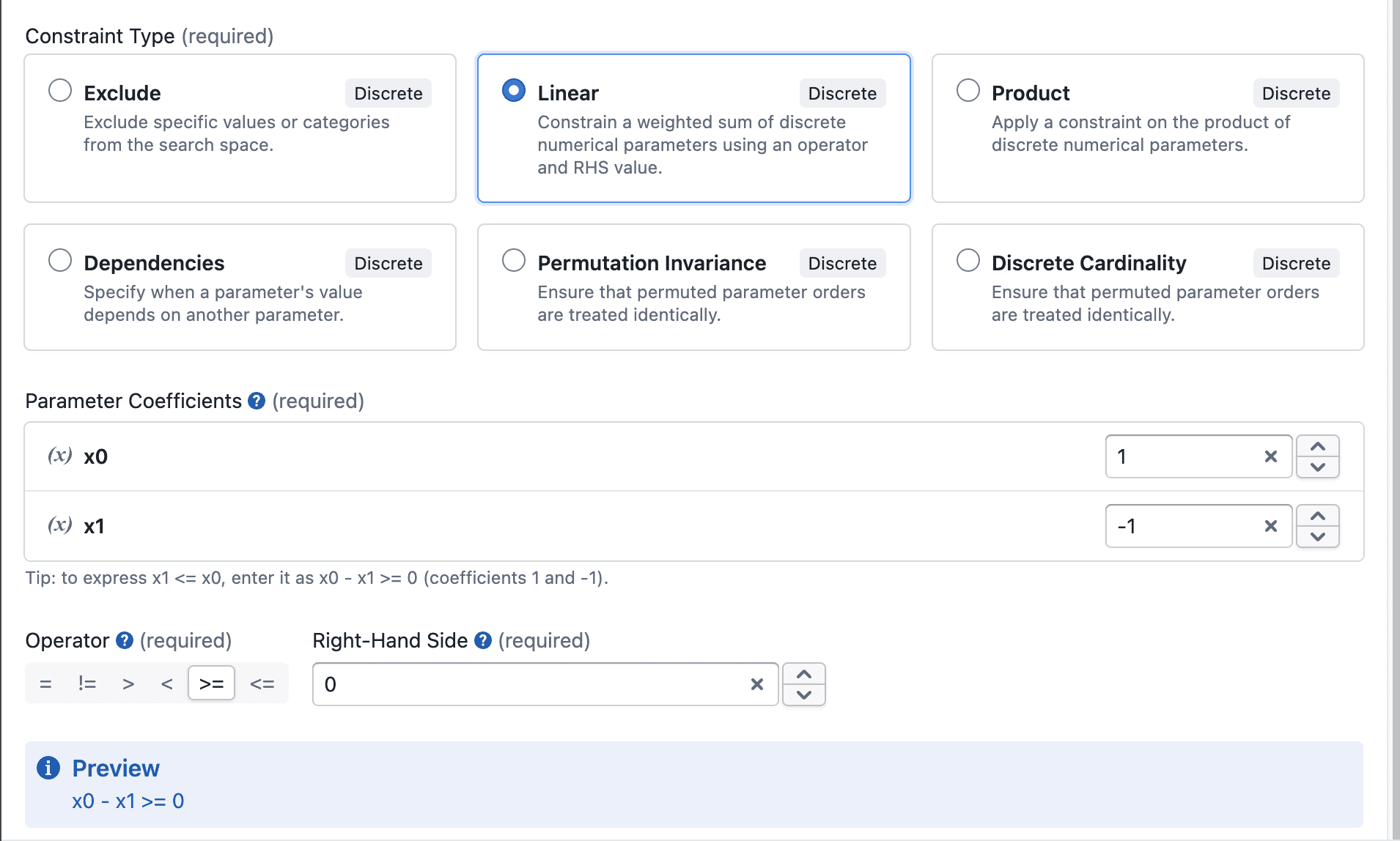
To make sure x1 ≤ x0, write it as x0 − x1 ≥ 0 and add a Linear constraint:
- Coefficients:
x0= 1,x1= −1 - Operator: >=
- Right-Hand Side: 0
Other improvements
- Negative numbers and decimals can be typed directly in Linear and Product constraints
- Removing a parameter from the Selected list now also removes its coefficient or condition
Notes
- Your existing Sum constraints are now Linear constraints with every coefficient set to 1, so they work exactly as before
- Tolerance only applies to the = and != operators